Gitlab runners on SKS
In this documentation, we will guide you through the steps to set up and run autoscaled Gitlab runners on Exoscale SKS clusters with Karpenter. This allows you to efficiently manage your CI/CD workloads by automatically scaling the number of Gitlab runners based on demand, reducing massively operating costs.
Prerequisites
As a prerequisite for the following documentation, you need:
- An Exoscale SKS cluster on the Pro plan with Karpenter addon enabled.
- Access to your cluster via
kubectlandhelm. - Basic Linux knowledge.
If you do not have access to an SKS cluster, follow the Quick Start Guide.
Configure Karpenter nodepools
We will create one ExoscaleNodeClass and two NodePools, one for the SKS kube-system and the Gitlab Runner manager, and one for
the Gitlab Runner jobs. Here is the configuration:
---
apiVersion: karpenter.exoscale.com/v1
kind: ExoscaleNodeClass
metadata:
  name: system
spec:
  # imageTemplateSelector automatically selects the appropriate OS template
  # based on Kubernetes version and variant (alternative to templateID)
  imageTemplateSelector:
    # version: Kubernetes version (semver format like "1.34.1")
    # If omitted (or if you use imageTemplateSelector: {}), the control plane's
    # current Kubernetes version will be auto-detected at runtime
    version: "1.35.0"

    # variant: Template variant (optional, defaults to "standard")
    # Options: "standard" for regular workloads, "nvidia" for GPU-enabled nodes.
    variant: "standard"

  diskSize: 50
  securityGroups:
    - <sks-security-group-id>
  # Optional: Define anti-affinity groups to spread nodes across failure domains
  antiAffinityGroups: []
---
apiVersion: karpenter.exoscale.com/v1
kind: ExoscaleNodeClass
metadata:
  name: gitlab-runners
spec:
  # imageTemplateSelector automatically selects the appropriate OS template
  # based on Kubernetes version and variant (alternative to templateID)
  imageTemplateSelector:
    # version: Kubernetes version (semver format like "1.34.1")
    # If omitted (or if you use imageTemplateSelector: {}), the control plane's
    # current Kubernetes version will be auto-detected at runtime
    version: "1.35.0"

    # variant: Template variant (optional, defaults to "standard")
    # Options: "standard" for regular workloads, "nvidia" for GPU-enabled nodes.
    variant: "standard"

  # Disk size in GB (default: 50, min: 10, max: 8000), you can adjust this based on your workload requirements
  diskSize: 200
  securityGroups:
    - <sks-security-group-id>
  # Optional: Define anti-affinity groups to spread nodes across failure domains
  antiAffinityGroups: []
---
apiVersion: karpenter.sh/v1
kind: NodePool
metadata:
  name: system
spec:
  template:
    metadata:
      labels:
        nodepool: system
    spec:
      nodeClassRef:
        group: karpenter.exoscale.com
        kind: ExoscaleNodeClass
        name: system

      # Startup taints prevent scheduling until node is fully ready
      startupTaints: []

      taints:
        - key: CriticalAddonsOnly
          value: "true"
          effect: NoSchedule

      # Instance type requirements
      requirements:
        - key: "node.kubernetes.io/instance-type"
          operator: In
          values:
            - "standard.medium"

      expireAfter: 168h # Recycle nodes every week

  # Disruption settings for cost optimization
  disruption:
    consolidationPolicy: WhenEmptyOrUnderutilized

    # Wait 30m before consolidating underutilized nodes
    consolidateAfter: 30m

    # Limit disruption rate
    budgets:
      - nodes: "10%" # Disrupt at most 10% of nodes at once

  # Weight for prioritization (higher = higher priority)
  weight: 50
---
apiVersion: karpenter.sh/v1
kind: NodePool
metadata:
  name: gitlab-runners
spec:
  template:
    metadata:
      labels:
        nodepool: gitlab-runners
    spec:
      nodeClassRef:
        group: karpenter.exoscale.com
        kind: ExoscaleNodeClass
        name: gitlab-runners

      taints:
        - key: workload
          value: gitlab-runner
          effect: NoSchedule

      requirements:
        - key: "node.kubernetes.io/instance-type"
          operator: In
          values:
            # Choose instance types that are suitable for Gitlab Runner jobs (e.g., more CPU or memory)
            - "standard.medium"
            - "standard.large"
            - "standard.extra-large"

      expireAfter: 168h # 7 days

  # Disruption settings for cost optimization
  disruption:
    consolidationPolicy: WhenEmpty # Don't consolidate when there is running jobs

    # Wait 2m before consolidating underutilized nodes, allowing for short-term spikes in demand
    consolidateAfter: 2m

    # Limit disruption rate
    budgets:
      - nodes: "30%" # Disrupt at most 30% of nodes at once

  # Weight for prioritization (higher = higher priority)
  weight: 50
Warning
Ensure to modify the <sks-security-group-id> placeholder with your Security Group ID prior to applying the manifests.
After applying this manifest you should have 2 nodes running, supporting system workloads.
Install Gitlab Runner
To install Gitlab Runner on your SKS cluster, you can use the official Helm chart provided by Gitlab.
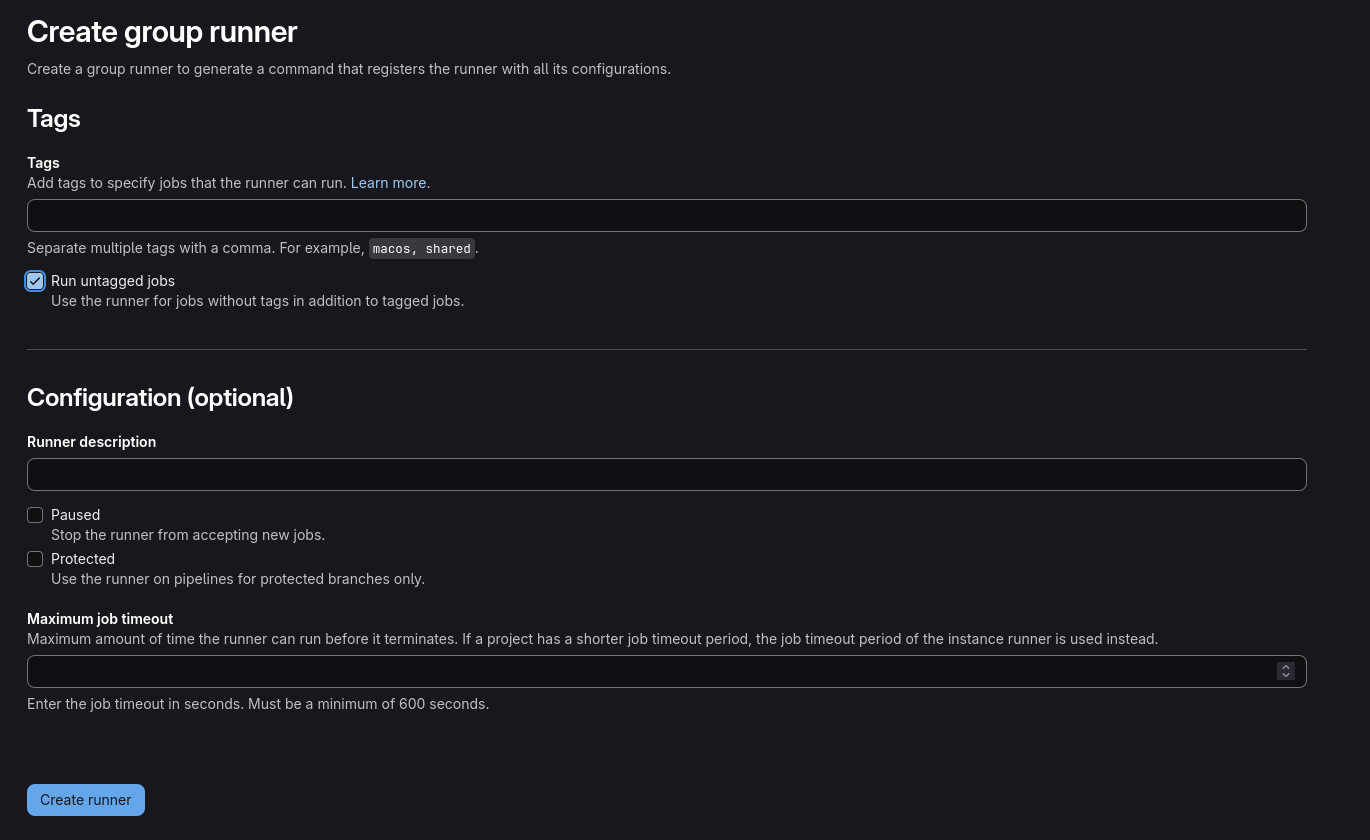
First you will need to gather a Gitlab token in order to permit your instance to access and maange on demand Gitlab Runners. You can obtain this token by going to your Gitlab group, then Builds > Runners, and then clicking on “Create group runner”. If you want to be very generic, tick the “Run untagged jobs” checkbox then click on “Create runner”. You can then copy the token and use it in the next step.
Next, we will need a helm values file to configure the Gitlab Runner installation. This file will contain the Gitlab URL, the token
we just obtained, and some tolerations to ensure that the Gitlab Runner pods are scheduled on the right nodes.
You can create a gitlab_helm_values.yaml file with the following content:
---
gitlabUrl: https://gitlab.com
runnerToken: <redacted>
rbac:
  create: true
serviceAccount:
  create: true
tolerations:
  - key: CriticalAddonsOnly
    effect: NoSchedule
    operator: Exists
runners:
  config: |
    [[runners]]
      [runners.kubernetes]
        [runners.kubernetes.node_selector]
          "nodepool" = "gitlab-runners"
        [runners.kubernetes.node_tolerations]
          "workload=gitlab-runner" = "NoSchedule"
Important
Ensure to modify the <redacted> placeholder with your runner token prior to applying the manifests.
In this configuration we will run Gitlab runners only on a dedicated nodepool tainted with workload=gitlab-runner:NoSchedule.
This allows us to have better control over the resources used by Gitlab runners and to ensure that they do not interfere with
other workloads running on the cluster. You can find more configuration options
here.
Now we will install the Gitlab runner orchestartor on the SKS cluster:
helm repo add gitlab https://charts.gitlab.io
helm repo update
helm upgrade --install --namespace gitlab-runner -f gitlab_helm_values.yaml gitlab-runner gitlab/gitlab-runner --create-namespace
Now you should have your gitlab-runner pod up and running
kubectl -n gitlab-runner get pod
NAME                             READY   STATUS    RESTARTS   AGE
gitlab-runner-5b4fc8b55c-dc84c   1/1     Running   0          15s
CI in action
Let’s create a demo CI in a project using this new runner:
tages:
  - stress-test
run-heavy-tasks:
  stage: stress-test
  image: alpine:latest
  script:
    - echo Starting simulation..."
    - sleep 240
    - echo "Job completed successfully!"
  parallel: 15 # Generates 15 jobs in paralllel
We now see that there is new nodes and many jobs created in Kubernetes:
❯ kubectl -n gitlab-runner get node
NAME                     STATUS   ROLES    AGE   VERSION
k-gitlab-runners-9z957   Ready    <none>   2m   v1.35.0
k-gitlab-runners-cwqqp   Ready    <none>   2m   v1.35.0
k-gitlab-runners-fhff7   Ready    <none>   2m   v1.35.0
k-system-cx6qg           Ready    <none>   44m   v1.35.0
k-system-hqdn5           Ready    <none>   51m   v1.35.0

❯ kubectl -n gitlab-runner get pod  -w
NAME                             READY   STATUS    RESTARTS   AGE
gitlab-runner-5b4fc8b55c-dc84c   1/1     Running   0          4m19s
runner-rthqphyc9-project-79409999-concurrent-0-xqczj3vf   0/2     Pending   0          0s
runner-rthqphyc9-project-79409999-concurrent-0-xqczj3vf   0/2     Pending   0          0s
runner-rthqphyc9-project-79409999-concurrent-1-lm7bbcy6   0/2     Pending   0          0s
runner-rthqphyc9-project-79409999-concurrent-1-lm7bbcy6   0/2     Pending   0          0s
runner-rthqphyc9-project-79409999-concurrent-2-oen5ne00   0/2     Pending   0          0s
runner-rthqphyc9-project-79409999-concurrent-2-oen5ne00   0/2     Pending   0          0s
runner-rthqphyc9-project-79409999-concurrent-3-8zy947mw   0/2     Pending   0          0s
runner-rthqphyc9-project-79409999-concurrent-3-8zy947mw   0/2     Pending   0          1s
runner-rthqphyc9-project-79409999-concurrent-4-ocz5qzj2   0/2     Pending   0          0s
runner-rthqphyc9-project-79409999-concurrent-4-ocz5qzj2   0/2     Pending   0          0s
runner-rthqphyc9-project-79409999-concurrent-5-e85r7h93   0/2     Pending   0          0s
runner-rthqphyc9-project-79409999-concurrent-5-e85r7h93   0/2     Pending   0          0s
runner-rthqphyc9-project-79409999-concurrent-6-ybpwijta   0/2     Pending   0          0s
runner-rthqphyc9-project-79409999-concurrent-6-ybpwijta   0/2     Pending   0          0s
runner-rthqphyc9-project-79409999-concurrent-7-kdgpclbl   0/2     Pending   0          0s
runner-rthqphyc9-project-79409999-concurrent-7-kdgpclbl   0/2     Pending   0          0s
runner-rthqphyc9-project-79409999-concurrent-8-jqm8z7b2   0/2     Pending   0          1s
runner-rthqphyc9-project-79409999-concurrent-8-jqm8z7b2   0/2     Pending   0          1s
runner-rthqphyc9-project-79409999-concurrent-9-74ridjck   0/2     Pending   0          0s
runner-rthqphyc9-project-79409999-concurrent-9-74ridjck   0/2     Pending   0          0s
# Jobs are now running
runner-rthqphyc9-project-79409999-concurrent-0-b3bxbvc0   2/2     Running   0          42s
runner-rthqphyc9-project-79409999-concurrent-1-mqfcjmqp   2/2     Running   0          46s
runner-rthqphyc9-project-79409999-concurrent-2-c5uk73ql   2/2     Running   0          42s
runner-rthqphyc9-project-79409999-concurrent-3-b0cdkf06   2/2     Running   0          41s
runner-rthqphyc9-project-79409999-concurrent-4-zrd5g4p9   2/2     Running   0          40s
runner-rthqphyc9-project-79409999-concurrent-8-0qf7voud   2/2     Running   0          51s
runner-rthqphyc9-project-79409999-concurrent-9-e0g8s5oc   2/2     Running   0          51s
runner-rthqphyc9-project-79409999-concurrent-9-e0g8s5oc   2/2     Running   0          67s
runner-rthqphyc9-project-79409999-concurrent-8-0qf7voud   2/2     Running   0          75s
runner-rthqphyc9-project-79409999-concurrent-1-mqfcjmqp   2/2     Running   0          80s