Use GPU MIG Partitioning
The Multi-Instance GPU (MIG) feature allows you to partition a physical GPU into multiple isolated instances, each with dedicated memory and compute resources.
MIG is useful when a full GPU would be too large for a single workload. By splitting one physical GPU into multiple GPU instances, you can run multiple smaller workloads on the same SKS node while giving each workload dedicated GPU memory and compute resources. This can improve GPU utilization for some workload types (e.g. AI inference).
Prerequisites
- A GPU instance with a MIG-capable GPU. On Exoscale, the following GPU types support MIG:
MIG helps improve utilization of the GPU resources you provision, but it does not change the billing unit and is only available on MIG-capable GPUs.
Enable MIG on SKS Standard NodePools
Portal
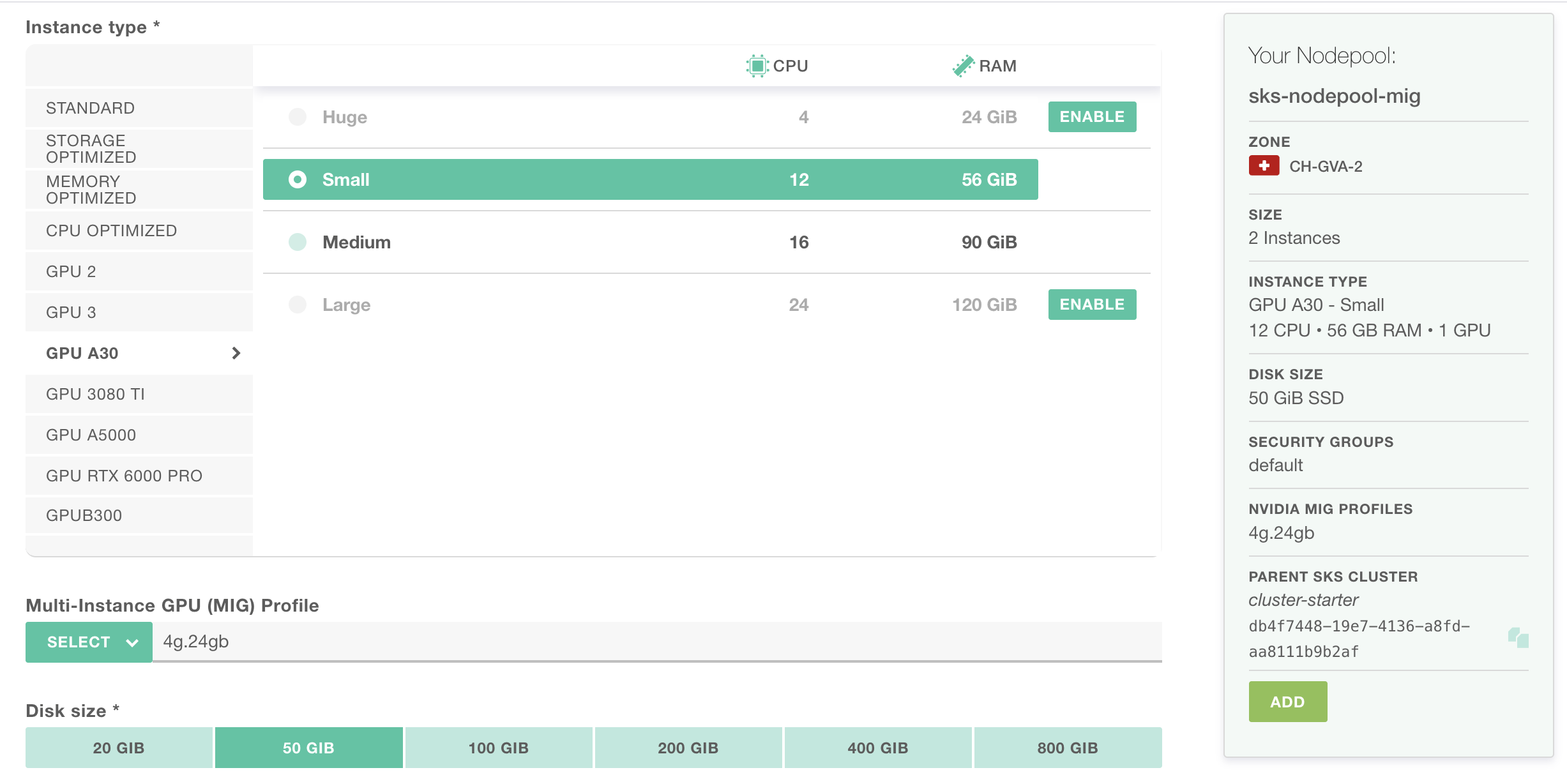
You can enable one of the supported MIG profiles for your GPU type when you create or update a nodepool:
- For new nodepools: navigate to
SKS > your_cluster > Add Nodepool. Select a MIG-capable GPU instance type, then choose the desired MIG profile from the dropdown. - For existing nodepools: navigate to
SKS > your_cluster > your_nodepool > Update Nodepool. Select the desired MIG profile from the dropdown.
Warning
To make your existing nodepool pick up the newly enabled MIG profile, you have to cycle your nodes.
CLI
The Exoscale CLI (starting from version 1.96.0) lets you enable a MIG profile on standard SKS nodepools. You only pass the profile name (e.g. 4g.24gb).
The GPU family (a30.24gb or rtxpro6000.96gb) is automatically defined from the nodepool instance type.
Create a cluster with a default nodepool that has MIG enabled:
exo compute sks create my-cluster \
  --zone ch-gva-2 \
  --nodepool-name gpu-pool \
  --nodepool-size 1 \
  --nodepool-instance-type gpua30.large \
  --nodepool-nvidia-mig-profile 4g.24gb
Add a MIG-enabled nodepool to an existing cluster:
exo compute sks nodepool add my-cluster gpu-pool \
  --instance-type gpurtx6000pro.medium \
  --size 1 \
  --nvidia-mig-profile 1g.24gb
Update the MIG profile on an existing nodepool.
exo compute sks nodepool update my-cluster gpu-pool \
  --nvidia-mig-profile 2g.48gb
You can also pass an empty value to disable MIG.
Warning
Updating the MIG profile of an existing nodepool only affects newly provisioned nodes. To make current nodes pick up the new profile, you have to cycle your nodes.
Terraform Provider
The Exoscale Terraform provider (starting from version 0.70.0) enables a MIG profile on a nodepool through the nvidia_mig_profile attribute of the exoscale_sks_nodepool resource.
You only set the profile name (e.g. 4g.24gb).
The GPU family (a30.24gb or rtxpro6000.96gb) is automatically deduced from the nodepool instance_type.
Create a MIG-enabled nodepool:
resource "exoscale_sks_nodepool" "gpu" {
  zone       = "ch-gva-2"
  cluster_id = exoscale_sks_cluster.my_cluster.id
  name       = "gpu-pool"

  instance_type      = "gpua30.large"
  size               = 1
  nvidia_mig_profile = "4g.24gb"
}
To change the profile, update nvidia_mig_profile and apply.
To disable MIG, remove the attribute.
The current profile is also exposed on the exoscale_sks_nodepool data source.
Warning
Updating the MIG profile of an existing nodepool only affects newly provisioned nodes. To make current nodes pick up the new profile, you have to cycle your nodes.
Enable MIG on Karpenter Nodepools
The SKS Node operating system is configured with TOML-formatted data.
Most critical parts of this data are set by our SKS product orchestrator. As a customer it’s possible to enrich this data with additional configuration.
In order to enable MIG, you can set specific configuration under both settings.kubelet-device-plugins.nvidia
and settings.kubelet-device-plugins.nvidia.mig.profile entries on spec.userData of the
Karpenter ExoscaleNodeClass resource.
For example if you want to select the “1g.24gb” profile on rtxpro6000 nodes, you can define:
apiVersion: karpenter.exoscale.com/v1
kind: ExoscaleNodeClass
metadata:
  name: nvidia-rtxpro6000-1g-24gb
spec:
  imageTemplateSelector:
    variant: nvidia
  diskSize: 100                                # Beware that GPU nodes enforce minimum disk size

  securityGroupSelectorTerms:
  - id: "5ea00f6e-1e92-456b-9381-2cb2c5937240" # Don't forget to attach proper security group

  userData: |
    [settings.kubelet-device-plugins.nvidia]
    device-partitioning-strategy = "mig"

    [settings.kubelet-device-plugins.nvidia.mig.profile]
    "rtxpro6000.96gb" = "1g.24gb"
On your referencing NodePool, nothing special except you need to select the proper instance type and reference the NodeClass:
apiVersion: karpenter.sh/v1
kind: NodePool
metadata:
  name: gpu-rtxpro6000-1g-24gb
spec:
  template:
    spec:
      nodeClassRef:
        group: karpenter.exoscale.com
        kind: ExoscaleNodeClass
        name: nvidia-rtxpro6000-1g-24gb
      requirements:
        - key: "node.kubernetes.io/instance-type"
          operator: In
          values:
            - "gpurtx6000pro.small"
            - "gpurtx6000pro.medium"
            - "gpurtx6000pro.large"
      taints:
        - key: "nvidia.com/gpu"
          value: "true"
          effect: "NoSchedule"
      expireAfter: 720h

  # [...]

  weight: 10
If a Pod requesting nvidia.com/gpu stays pending because of a lack of GPU, Karpenter will trigger the creation
of a new GPU node with those characteristics:
apiVersion: v1
kind: Node
# [...]
spec:
# [...]
  taints:
  - effect: NoSchedule
    key: nvidia.com/gpu
    value: "true"
status:
# [...]
  allocatable:
    cpu: 35700m
    ephemeral-storage: "89785012888"
    hugepages-1Gi: "0"
    hugepages-2Mi: "0"
    memory: 123120044Ki
    nvidia.com/gpu: "4"
    pods: "110"
  capacity:
    cpu: "36"
    ephemeral-storage: 102083312Ki
    hugepages-1Gi: "0"
    hugepages-2Mi: "0"
    memory: 123632044Ki
    nvidia.com/gpu: "4"
    pods: "110"
# [...]
Supported MIG Profiles
A30 MIG Profiles
The a30.24gb device name comes with the available MIG profiles below:
| MIG profile | # partitions |
|---|---|
1g.6gb | 4 |
1g.6gb+me | 1 |
2g.12gb | 2 |
2g.12gb+me | 2 |
4g.24gb | 1 |
RTX6000PRO MIG Profiles
The rtxpro6000.96gb device name comes with the available MIG profiles below:
| MIG profile | # partitions |
|---|---|
1g.24gb | 4 |
1g.24gb+me | 1 |
1g.24gb+gfx | 4 |
1g.24gb+me.all | 1 |
1g.24gb-me | 4 |
2g.48gb | 2 |
2g.48gb+gfx | 2 |
2g.48gb+me.all | 1 |
2g.48gb-me | 2 |
4g.96gb | 1 |
4g.96gb+gfx | 1 |
Profile References
The profile suffix indicates whether additional GPU capabilities are assigned to the MIG instance or not.
+meprofiles: Include at least one media engine (NVDEC, NVENC, NVJPG, or OFA).+gfx: Adds support for graphics APIs (new in GB20X).+me.all: Allocates all available media engines to this instance (does not include graphics support).-me: Excludes all media engines for pure compute workloads.
Source: https://docs.nvidia.com/datacenter/tesla/mig-user-guide/latest/supported-mig-profiles.html
Limitations
Exoscale currently supports the single MIG strategy, i.e., all GPUs within a node are partitioned with the same profile. The mixed strategy (different profiles on the same GPU) is currently unsupported. For more details on MIG strategies, see the NVIDIA MIG configuration documentation.
References
- Use GPU MIG Partitioning (on compute instance).
- Multi-Instance GPU (MIG) allows you to partition a physical GPU into multiple isolated instances, each with dedicated memory and compute resources. This is particularly useful when you need to run multiple workloads that don’t require a full GPU.
- Multi-Instance GPU (MIG) profiles