Overview - Dedicated Hypervisors
Architecture
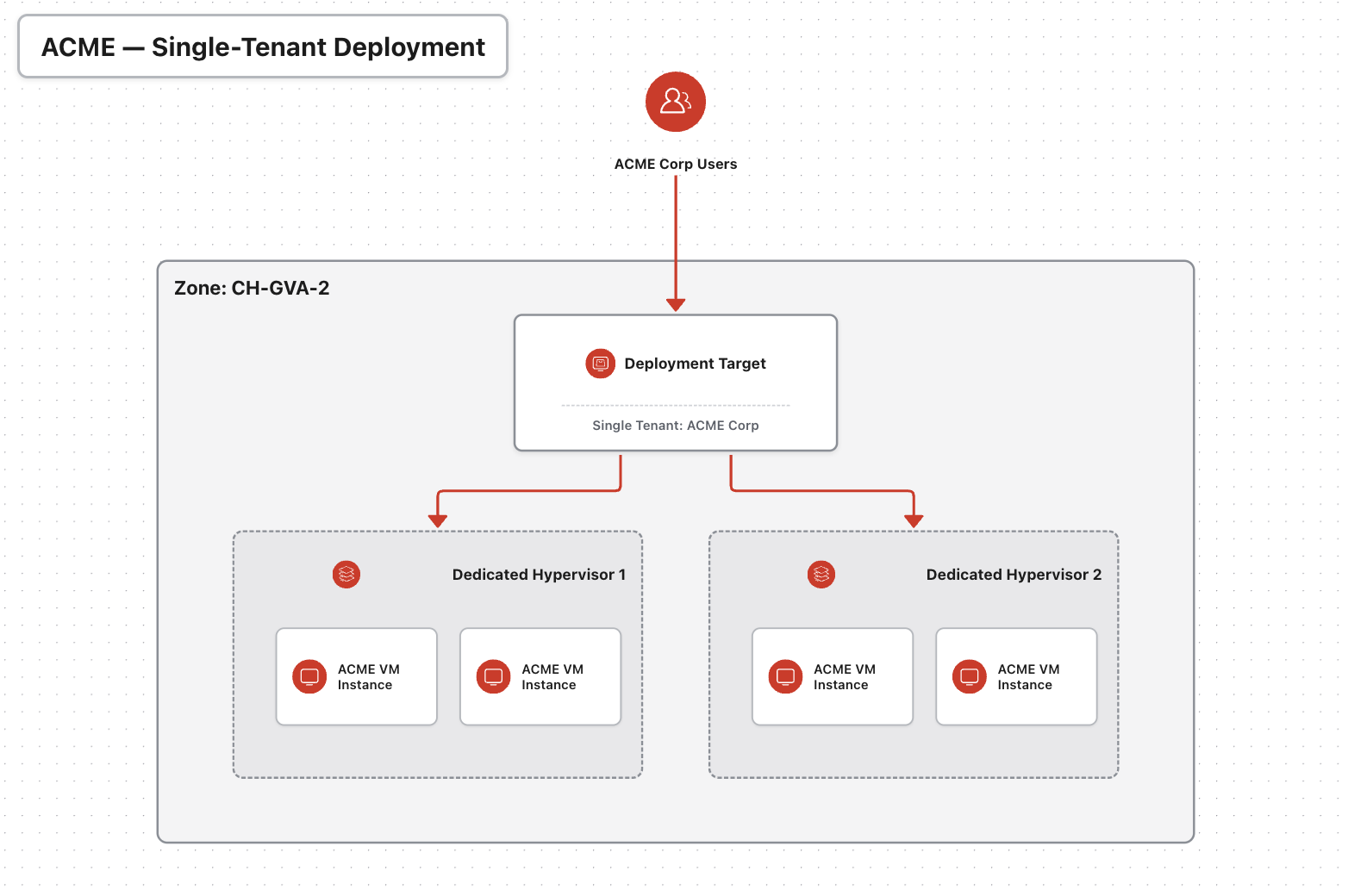
Exoscale Dedicated Hypervisors provide single-tenant compute capacity through a Deployment Target. This allows you to launch instances on hardware that runs only your instances and the Exoscale hypervisor.
Below is a sample setup for a customer called “ACME Corp”, running four instances across two dedicated hypervisors.
This product is designed for workloads that require dedicated hardware isolation, including use cases with specific licensing, compliance, or regulatory requirements.
You can deploy and manage your virtual machines using the same CLI and APIs as standard Compute Instances, while benefiting from single-tenant access to the underlying CPU, memory, and storage resources.
You can also make use of the same features detailed in the Compute howto section .
Available Configurations
Dedicated Hypervisors are offered in a set of predefined configurations, combining GPU, CPU, memory, and local storage. These configurations are designed to cover common workload profiles, from balanced compute to storage-intensive use cases.
The values listed below indicate the usable capacity.
Standard Hypervisors
Indicative balanced configurations for general purpose workloads.
| vCPU | RAM (GB) | Local Storage (GB) |
|---|---|---|
| 96 | 464 | 6912 |
| 144 | 704 | 10368 |
Note
- Configurations may vary depending on the hardware generation and Zone.
Storage Optimized Hypervisors
Indicative configurations with significantly higher local storage capacity, suitable for data intensive workloads.
| vCPU | RAM (GB) | Local Storage (GB) |
|---|---|---|
| 96 | 464 | 27540 |
| 144 | 704 | 41472 |
Note
- Configurations may vary depending on the hardware generation and Zone.
GPU Dedicated Hypervisors
GPU-enabled Dedicated Hypervisors provide exclusive access to GPU resources with full host-level isolation. These configurations are designed for AI, machine learning, rendering, and high-performance workloads.
| GPU Model | GPUs | vCPU | RAM (GB) | Notes |
|---|---|---|---|---|
| RTX Pro 6000 | 8 | 288 | 960 | Blackwell generation GPU designed for large-scale inference, LLM workloads, and high-throughput AI services |
| A5000 | 6 | 64 | 336 | Versatile GPU for inference, fine-tuning, rendering, and simulation workloads |
| A40 | 8 | 96 | 448 | GPU optimized for inference, batch processing, and visualization workloads |
| RTX 3080 Ti | 6 | 64 | 336 | Cost-efficient GPU for smaller inference workloads, experimentation, and rendering |
Note
- Configurations may vary depending on the hardware generation and Zone.
- GPU Dedicated Hypervisors are only available in selected zones and are subject to capacity constraints.
- Available GPU models, configurations, and hardware generations may vary by Zone.
- For detailed availability or specific requirements, please open a Support Ticket or contact Exoscale Sales via our contact form.
Working with Availability Requirements
When considering Dedicated Hypervisors, it is advised to always order N+1 units of the same type in order to help maintain availability during standard operations. In the contrary situation, for a proactive maintenance happening on a specific Dedicated Hypervisor, then the workload will not not be migrated and will require a shutdown during the time of the maintenance. Refer to our the product SLA for the modalities.
Terminology
Understanding the basic terms used in Exoscale Dedicated Hypervisors will help you get up and running quickly.
- Dedicated Hypervisor
- A Dedicated Hypervisor is the underlying host that powers Compute Instances on single-tenant infrastructure. It is reserved for use by one customer and is available in different configuration types, including Standard, Storage Optimized, and GPU.
- Deployment Target
- A virtual abstraction layer that allows you to provision Compute Instances onto dedicated infrastructure using a specific Deployment Target ID. While a target can map to a single hypervisor, it most commonly encompasses a pool of multiple hypervisors. Both the deployment target and its underlying composition are fully configured, maintained, and managed by Exoscale. See the Deployment Target API reference.
Features
- Hardware Isolation
- Run instances on dedicated hardware that is isolated from other Exoscale Compute customers.
- Rapid Deployment
- Launch virtual machines within seconds through the Exoscale Portal, CLI, or API.
- Flexible Instance Types
- Choose from various instance families tailored to specific workloads.
- Local SSD Storage
- All instances come with enterprise-grade local SSD RAID10 storage, ensuring high I/O performance and low latency.
- Custom Templates & Snapshots
- Create and deploy instances using custom templates, and take snapshots for backups or cloning purposes.
- Anti-Affinity Groups
- Distribute instances across different physical hypervisors to improve availability by using Anti-Affinity Groups. Please note that the maximum size of your Anti-Affinity Group is limited by the total number of hypervisors available within your Deployment Target, and the limit of 8 instance per Anti Affintiy Group [whichever is lower].
- vTPM and Secure Boot
- Enhance instance security with vTPM for TPM 2.0 support, enabling Windows BitLocker encryption. Secure Boot helps ensure that only signed operating system images are loaded.
- Encryption at Rest
- Root volumes are transparently encrypted with AES-256 in XTS mode, with a unique key per volume. Encryption cannot be disabled. Learn more about encryption at rest.
- Built-In IAM
- Use Identity and Access Management to control API key permissions with granular access policies.
- Instance Pools
- Automatically manage groups of identical instances for high availability and scalability. Follow the Dedicated Hypervisor Instance Pools guide.
Get started using Exoscale Dedicated Hypervisor in the Quick-Start. For advanced usage check the How-To section.