Application Consistent Backups
Using Volume Shadow Copy Service (VSS) is essential when snapshotting a Windows instance because it ensures application-consistent backups, not just crash-consistent ones. VSS coordinates with the Windows OS and VSS-aware applications (such as SQL Server or Exchange) to momentarily pause writes, flush in-memory data to disk, and capture a clean snapshot. This process prevents file corruption, reduces recovery issues, and makes restores faster and more reliable. In short, VSS snapshots help guarantee that your backups are usable, consistent, and production-safe on Windows systems built on Microsoft technologies.
Requirements for Application-Consistent Backups
QEMU Guest Agent Installed
- The QEMU Guest Agent must be installed on the Windows guest.
- This agent enables communication between Exoscale Hypervisor and guest for proper snapshot coordination.
- For Exoscale Windows templates, this is now standard.
QEMU Guest Agent Enabled
- Ensure the agent service is running and enabled on the guest.
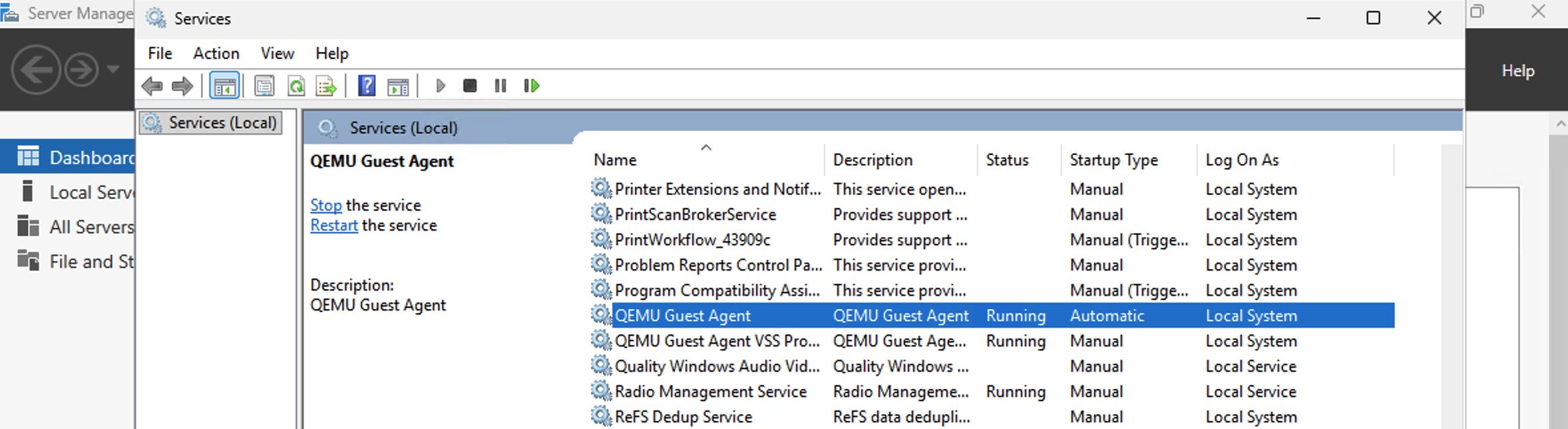
Windows QEMU Guest Agent - For Exoscale Windows templates, this is now standard.
- Ensure the agent service is running and enabled on the guest.
Enable Agent at Instance Creation
- When provisioning a new instance, enable Application-consistent snapshots. If the selected template already has this setting enabled, it will be automatically enabled for the instance.
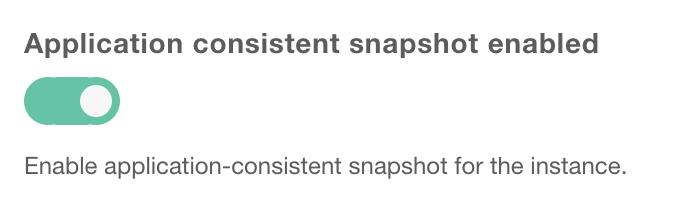
Application consistent snapshot enabled
- When provisioning a new instance, enable Application-consistent snapshots. If the selected template already has this setting enabled, it will be automatically enabled for the instance.
VSS Support on the Guest
- Ensure that Volume Shadow Copy Service (VSS) is functional within Windows guest.
- VSS must be able to coordinate with applications like SQL Server, Exchange, or file services to create application-consistent snapshots.
Sufficient Storage for Snapshots
- Ensure there’s enough free space to hold temporary snapshot data.
Permissions and Administrative Access
- The agent and VSS must run with appropriate privileges (typically administrative) to access all necessary files and services.
Regular Testing of Snapshots
- Periodically test snapshot creation and restores to ensure application consistency. For guidance on creating and validating snapshots from an existing instance, refer to
Using a Custom Windows Template with Application-Consistent Backups
To enable application-consistent backups for a custom Windows template on Exoscale, follow these requirements and steps:
Requirements
QEMU Guest Agent
- The QEMU Guest Agent must be installed on the Windows guest.
- This agent enables communication between Exoscale Hypervisor and guest for proper snapshot coordination.
Volume Shadow Copy Service (VSS)
- Must be functional inside the Windows guest for application-consistent snapshots.
Registering a Custom Template
When registering your custom Windows template, you must use the --application-consistent-snapshot-enabled flag.
Example command:
exo compute instance-template register custom-windows \
  https://sos-at-vie-1.exo.io/private-template/windows-template/windows.qcow2 \
  b2dddb232d7d5680bbb7be04d56969bb \
  --application-consistent-snapshot-enabled \
  --boot-mode uefi \
  --description "Custom Windows Template" \
  --username Administrator \
  -z at-vie-1
 ✔ Registering template "custom-windows"... 30m4s
┼─────────────────────────────────────────┼──────────────────────────────────────┼
│                TEMPLATE                 │                                      │
┼─────────────────────────────────────────┼──────────────────────────────────────┼
│ ID                                      │ 4a1797f8-1480-43fe-89de-4b70ca8c5cb0 │
│ Zone                                    │ at-vie-1                             │
│ Name                                    │ custom-windows                       │
│ Description                             │ Custom Windows Template              │
│ Family                                  │ other (64-bit)                       │
│ Creation Date                           │ 2026-02-18 12:52:07 +0000 UTC        │
│ Visibility                              │ private                              │
│ Size                                    │ 150 GiB                              │
│ Version                                 │                                      │
│ Build                                   │                                      │
│ Maintainer                              │                                      │
│ Default User                            │ administrator                        │
│ SSH key enabled                         │ true                                 │
│ Password enabled                        │ true                                 │
│ Boot Mode                               │ uefi                                 │
│ Checksum                                │ b2dddb232d7d5680bbb7be04d56969bb     │
│ Application Consistent Snapshot Enabled │ true                                 │
┼─────────────────────────────────────────┼──────────────────────────────────────┼
Enabling Application-Consistent Backups on an Existing Instance
If your Windows instance does not have the QEMU Guest Agent installed, follow these steps to enable application-consistent backups.
Steps
1. Update the Instance to Enable Application-Consistent Snapshots
exo compute instance update windows-without-acs \
  --application-consistent-snapshot-enabled \
  -z at-vie-1
   ✔ Updating instance "windows-without-acs"... 0s
┼─────────────────────────────────────────┼──────────────────────────────────────┼
│            COMPUTE INSTANCE             │                                      │
┼─────────────────────────────────────────┼──────────────────────────────────────┼
│ ID                                      │ d225c530-ddab-4ffd-ae58-e38e131b5129 │
│ Name                                    │ windows-without-acs                  │
│ Creation Date                           │ 2018-06-05 09:51:16 +0000 UTC        │
│ Instance Type                           │ memory.huge                          │
│ Template                                │ Windows Server 2016                  │
│ Zone                                    │ at-vie-1                             │
│ Anti-Affinity Groups                    │ n/a                                  │
│ Deploy Target                           │ -                                    │
│ Security Groups                         │ windows_default                      │
│                                         │ windows_default_rules                │
│ Private Instance                        │ No                                   │
│ Private Networks                        │ n/a                                  │
│ Elastic IPs                             │ n/a                                  │
│ Public IP                               │ inet4                                │
│ IP Address                              │ 185.150.10.210                       │
│ IPv6 Address                            │ -                                    │
│ SSH Key                                 │ -                                    │
│ Disk Size                               │ 150 GiB                              │
│ State                                   │ stopped                              │
│ Labels                                  │ n/a                                  │
│ Secure Boot                             │ false                                │
│ Tpm                                     │ false                                │
│ Reverse DNS                             │                                      │
│ Application-Consistent Snapshot enabled │ true                                 │
┼─────────────────────────────────────────┼──────────────────────────────────────┼
This prepares the instance for application-consistent snapshots.
2. Install QEMU Guest Agent in the Operating System
The QEMU Guest Agent allows communication between the host and Windows guest, enabling features like application-consistent snapshots. This guide covers both manual and unattended installation. On Exoscale, all official Windows templates already include and enable the QEMU Guest Agent by default, it’s only needed for custom templates.
Requirements
- Windows Server 2022 or later.
- Administrative privileges on the Windows guest.
1. Manual Installation
Download the QEMU Guest Agent
- Available in the official QEMU Windows installer or from the Fedora VirtIO Windows repository.
Run the Installer
- Launch the downloaded installer (
virtio-win-guest-tools.exe). - Select QEMU Guest Agent during the installation wizard.
- Launch the downloaded installer (
Enable and Start the Service
- Open Services (
services.msc). - Locate QEMU Guest Agent, set Startup type to
Automatic, and click Start.
- Open Services (
Verify Installation
- Open Command Prompt (admin) and run:
sc query qemu-ga- The service should display
STATE: RUNNING.
- The service should display
- Open Command Prompt (admin) and run:
2. Unattended Installation
For automated deployments, you can install the QEMU Guest Agent silently using the installer’s MSI or EXE with command-line options.
Example using MSI (preferred if available):
msiexec /i "qemu-ga-x64.msi" /qn /norestartExample using EXE installer:
virtio-win-guest-tools.exe /S /COMPONENTS="GuestAgent"After installation, ensure the service is started and set to automatic:
sc config qemu-ga start= auto
sc start qemu-ga- The service should display
STATE: RUNNING.
3. Power Off the Instance
exo compute instance stop windows-without-acs -z at-vie-14. Start the Instance Back Up
exo compute instance start windows-without-acs -z at-vie-1Notes
- The instance must have VSS (Volume Shadow Copy Service) enabled for application-consistent backups to work.
- After completing these steps, all snapshots taken will be application-consistent, provided the QEMU Guest Agent remains installed and running.
- If an application-consistent snapshot cannot be taken for any reason (for example, the QEMU Guest Agent is not running or VSS encounters an issue), the system will automatically fall back to creating a crash-consistent snapshot.
Verifying Application-Consistent Snapshots
When creating a snapshot, the Exoscale CLI now clearly indicates whether application-consistent backups are enabled for the instance.
After the snapshot is created, the snapshot details will include the field Application Consistent Snapshot, showing true or false.
Example
exo compute instance snapshot create windows-acs-enabled -z hr-zag-1
✔ Creating snapshot of instance "windows-acs-enabled"... 2m7s
┼─────────────────────────────────┼─────────────────────────────────────────┼
│            SNAPSHOT             │                                         │
┼─────────────────────────────────┼─────────────────────────────────────────┼
│ ID                              │ ae6eb677-2535-4892-a741-149d128d14e2    │
│ Name                            │ windows-acs-enabled-name_20260219075143 │
│ Creation Date                   │ 2026-02-19 07:51:43 +0000 UTC           │
│ State                           │ exported                                │
│ Size (GB)                       │ 50                                      │
│ Instance                        │ windows-acs-enabled                     │
│ Zone                            │ hr-zag-1                                │
│ Application Consistent Snapshot │ true                                    │
┼─────────────────────────────────┼─────────────────────────────────────────┼
This makes it easy to confirm at snapshot time that the instance was backed up using an application-consistent snapshot.