Overview
Identity and Access Management (IAM) defines which permissions and actions individuals and services can perform on your platform. These rules apply regardless of how you access Exoscale—whether programmatically via the command line, through your preferred programming language, via integrations with third-party tools, or through the user-friendly web portal.
Exoscale provides multiple interaction methods with its platform, including programmatic access through the command line, various programming languages, and integrations with third-party tools, as well as a simple user interface via the web portal; in all instances, users will encounter Identity and Access Management (IAM), which determines permissions and roles for both individuals and services.
Understand Roles and Policies
IAM is composed by 2 main building blocks:
- Roles
- which act as a container for a single Policy and add some options on top of it.
- Policies
- which are a set of rules describing what can and what cannot be done.
Authorization Flow
IAM decouples authorization from authentication. Therefore, we can split authorization through several levels or “gateways” for a single request.
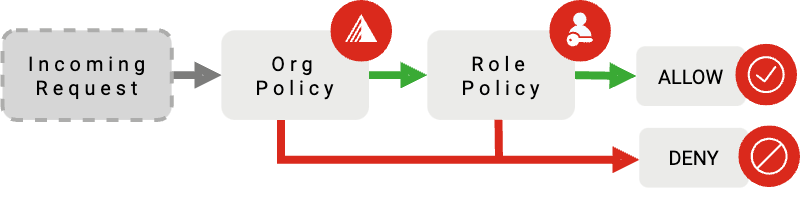
- Organization Policy
- the ORG Policy applies to any User or API Key within an organization.
- Role Policy
- the ROLE Policy is assigned to one or more API Keys or Users.
A request must be authorized at both levels to be processed by the platform. The Organization Policy defaults to an empty set of rules, allowing all operations to be performed.
Warning
Beware to not lock yourself out. A wrong Organization Policy might end up denying you access to the entire platform. At any time, an Owner of an Organization can reset the Organization Policy via the web portal.
Roles
A Role is a way to store a Policy:
{
  "name": "my-new-role",
  "policy": {
    "default-service-strategy": "deny",
    "services": {
      "iam": {
        "type": "allow"
      }
    }
  }
}
In the example above, the role called "my-new-role" contains a Policy stating that all operations are denied except for IAM services, which are explicitly allowed.
A Role can have one and only one Policy. Roles can then be assigned to one or more API Keys or Users, applying the permissions stated in its Policy.
Policies
A Policy is composed of
- The Services map - a separation of the authorization logic according to which service class the request belongs to.
- The Default Service Strategy - a default top-level
allowordenydecision that applies when there is no entry in the services map for the service of the incoming API operation. For example:list-zonesis an operation that belongs to thecomputeservice - ifcomputeis not present in the services map, the default service strategy will be applied.
{
  "default-service-strategy": "allow",
  "services": {
    "compute": {...},
    "dbaas": {...}
  }
}
Requests are evaluated in the context of the service class they belong to - Compute, SOS, DBaaS, etc - a Policy can define one of the following authorization bodies for each service:
- Nothing in the absence of a specification, use the default service strategy
- Allow overrides the default service strategy - allow all requests.
- Deny overrides the default service strategy - deny all requests.
- Rule-based a more fine-grained approach to authorization
Note
Policy updates may not take effect immediately due to some background synchronization. Generally, you should design your usage patterns with re-use of Roles in mind, and if you require frequent rotation, favor rotating API Keys rather than Roles.
Terminology
- Identity
- Represents users or services that have access to the Exoscale platform. These can be individuals, applications, or any entity that interacts with Exoscale resources.
- Access Management
- The process and policies used to control who is authenticated and authorized to use resources.
- Policies
- Sets of permissions attached to identities that define what actions they can perform on which resources.
- Roles
- Collections of policies that can be assigned to identities to streamline permission assignments that meet specific needs or job functions.
- Permissions
- Specific rights that define what actions an identity can perform, such as read, write, or delete resources.
- Authentication
- The process of verifying an identity when it tries to access resources.
- Authorization
- The process of determining whether an authenticated identity has permission to perform a requested action on a resource.
Features
- Fine-Grained Access Controls
- Allows administrators to define precise access controls at various levels, ensuring that users and services have only the permissions they need.
- Policy-Based Permissions
- Provides the ability to write policies that specify who can access which resources and what actions they can perform.
- Role-Based Access Control (RBAC)
- Supports assigning roles to users and groups, simplifying the management of permissions by associating roles with specific job functions.
- Multi-Factor Authentication (MFA)
- Enhances security by requiring multiple forms of verification before granting access to the platform.
- Audit Logging
- Keeps detailed logs of user activities and changes made within the IAM system, aiding in compliance and monitoring.
- API Access
- Provides programmatic access to manage IAM resources, allowing developers to integrate IAM functionality into their workflows.
- Customizable Policies
- Allows for the creation of customized policies tailored to specific organizational needs, accommodating diverse security requirements.