Overview - KMS
Overview
Exoscale Key Management Service (KMS) is a centralized, fully managed security service that enables you to create, control, and manage the lifecycle of cryptographic keys. It provides data encryption and digital signature capabilities across your Exoscale workloads, custom applications, and external integrations.
Fundamentally, data encryption shifts the security challenge from protecting the data to protecting the keys. Exoscale KMS addresses this by defining a secure key hierarchy that cryptographically wraps your generated Data Encryption keys. It safeguards your assets while offering granular operations for access and control. The keys you create never leave the KMS environment unencrypted. All management and usage operations are executed securely through the Exoscale KMS API.

What This Page Covers
Exoscale KMS supports several kinds of keys and key storage options. This page introduces them in the following order:
- KMS Keys: The keys you create and manage in Exoscale KMS:
- Symmetric keys for encryption, decryption and envelope encryption.
- Asymmetric keys for RSA encryption and digital signatures.
- Replicated keys that are available in several Exoscale zones.
- KMS keys in external key stores, with an additional layer of encryption backed by a key that you hold outside of Exoscale.
- Cryptographic Primitives: The algorithms and the key hierarchy that Exoscale KMS relies on.
- Access Control with IAM: How access to KMS keys and operations is authorized.
- Create a KMS Key: The choices you make when you create a key.
- Cryptographic Operations: How each operation works, including offline operations with public keys.
- Key Stores: External Key Stores (XKS), which connect Exoscale KMS to a key manager that you operate.
This page is a conceptual overview. For step-by-step instructions, see the Quick Start and the How-To guides.
Integration with Exoscale Services
Note
Encryption at rest is already fully available and supported across Exoscale. Native integration with Exoscale KMS to back these capabilities will be introduced shortly after the initial product launch.
Exoscale KMS integrates seamlessly with the broader Exoscale ecosystem to secure your infrastructure assets automatically. By utilizing either custom KMS keys or the Default Organization Key, server-side encryption is enforced across your cloud resources to ensure that data at-rest is always encrypted.
Exoscale Object Storage (SOS): Secure your buckets and objects. In KMS mode, each object is encrypted using a unique Data Encryption Key (DEK) wrapped by your specified KMS key.
Compute: Root Volumes are encrypted at-rest. The Compute orchestrator will leverage your default KMS key, unless specified otherwise (i.e., a KMS key of your choice).
Key Management Service Concepts
KMS Keys
- KMS Key
- A customer-controlled cryptographic key managed within Exoscale KMS. A KMS key has a unique identifier, a usage that defines which operations it supports, a key specification that defines its algorithm, and a lifecycle state (for example enabled, disabled or pending deletion).
- Default Organization Key
- A platform-managed KMS key automatically provisioned for every Exoscale organization upon onboarding. It guarantees that baseline encryption workflows are available out-of-the-box without additional setup. This key is fully managed by Exoscale, it may not be deleted or disabled, it is replicated in all Exoscale zones at all times and you may not modify or disable its rotation schedule.
- Key Material
- The raw cryptographic bytes that constitute a key, used to perform encryption, decryption, wrapping or signing operations.
The combination of the usage and the key specification (key-spec) determines the kind of KMS key:
| Kind | Usage | Key Specifications |
|---|---|---|
| Symmetric key | encrypt-decrypt | AES_256 |
| Asymmetric encryption key | encrypt-decrypt | RSA_3072, RSA_4096 |
| Asymmetric signing key | sign-verify | RSA_3072, RSA_4096, ECC_NIST_P256, ECC_NIST_P384, ECC_NIST_P521, ECC_EDWARDS25519, ML_DSA_65, ML_DSA_87 |
Symmetric Keys
A symmetric KMS key uses the same secret key material to encrypt and decrypt data. It is created with the encrypt-decrypt usage and the AES_256 key specification, which is the default when you create a key. Symmetric key material never leaves Exoscale KMS unencrypted.
Use symmetric keys to:
- Encrypt and decrypt data through the KMS
encryptanddecryptoperations, using the CLI, SDKs, or API. - Protect large data with envelope encryption: Use Exoscale KMS to generate on-demand Data Encryption Keys (DEKs). Your application receives a plaintext DEK for immediate, high-speed local encryption and a wrapped (encrypted) DEK. You can store the wrapped DEK safely alongside your data, ensuring the master key material never leaves the KMS.
- Re-encrypt data from one symmetric key, or key version, to another without exposing the plaintext.
- Data Encryption Key (DEK)
- A key used to encrypt and decrypt actual customer data at rest. DEKs are generated on-demand and are never stored in plaintext by the KMS. You request either an
AES-256key or a custom length between 1 and 1024 bytes. Only symmetric KMS keys can generate DEKs.
Key Rotation
Key rotation generates fresh, versioned cryptographic key material for a symmetric KMS key, incrementing its version while keeping the Key ID identical. Your applications therefore do not need to be updated with new key identifiers. After rotation, legacy versions remain authorized exclusively for decrypting existing data, while the latest version is automatically used for all new encryption operations. Only symmetric keys can be rotated.
- Automatic Rotation: Enabled by default when a key is created, with a period of 365 days. You can disable it, or re-enable it with a period between 90 and 2560 days.
- Rotation Constraints: Keys can be rotated automatically (based on a schedule you define) or manually. Manual rotation is limited to a maximum of 10 times per key. To be rotated, a key must have the
encrypt-decryptusage with theAES_256key specification, and must not be disabled or pending deletion. For multi-zone keys, rotation can only be triggered from the key’s designated origin zone. - Rotation Process: The KMS generates new encrypted key material tied to the infrastructure Root Key. The key’s version and revision numbers are incremented, and the new cryptographic material is appended securely to the database.
- Keys in an External Key Store: Automatic rotation is not enabled when the key is created, but you can enable it or rotate the key manually. Rotation only renews the key material held by Exoscale KMS; rotating the external key is managed in your external key manager.
- Multi-Zone Replication: If the rotated key is multi-zone enabled, the KMS automatically synchronizes the new key material asynchronously across all of your configured replica zones.
To rotate a key, see Rotate a KMS Key.
Asymmetric Keys
An asymmetric KMS key consists of a public/private key pair. The private key is wrapped under the infrastructure Root Key, in the same way as symmetric key material, and never leaves the KMS unencrypted. The public key is not secret: it is stored unencrypted alongside the wrapped private key and can be exported to anyone who needs to encrypt data for you or verify your signatures.
Depending on its usage, an asymmetric key is used either for encryption or for digital signatures.
Asymmetric Encryption Keys
When you create a KMS key with the encrypt-decrypt usage and an RSA key-spec, the KMS generates an RSA key pair used to encrypt payloads with RSA-OAEP.
Asymmetric encryption is useful when data must be encrypted by parties that have no access to the KMS: they encrypt locally with the exported public key, and only authorized callers of the KMS can decrypt the result. RSA-OAEP can only encrypt small payloads, such as secrets or keys. For larger data, use a symmetric KMS key with envelope encryption instead.
| Key Spec | Encryption Algorithm | OAEP Hash Function | Maximum Plaintext Size |
|---|---|---|---|
RSA_3072 | RSAES_OAEP_SHA_256 | SHA-256 | 318 bytes |
RSA_4096 | RSAES_OAEP_SHA_256 | SHA-256 | 446 bytes |
The OAEP hash function is SHA-256 for all key specifications. External parties encrypting with the exported public key must use the same hash function, otherwise the KMS cannot decrypt the ciphertext.
Asymmetric Signing Keys
When you create a KMS key with the sign-verify usage, the KMS generates a key pair used to create and verify digital signatures.
Supported Key Specifications
When creating a signing key, you must select a key-spec. It defines the algorithm family and key size, and is enforced for every subsequent operation on that key.
| Key Spec | Family | Signing Algorithms | Hash Function | Standard |
|---|---|---|---|---|
RSA_3072 | RSA | RSASSA_PSS_SHA_256, RSASSA_PSS_SHA_384, RSASSA_PSS_SHA_512, RSASSA_PKCS1_V1_5_SHA_256, RSASSA_PKCS1_V1_5_SHA_384, RSASSA_PKCS1_V1_5_SHA_512 | SHA-256, SHA-384 or SHA-512 | FIPS 186-5 |
RSA_4096 | RSA | RSASSA_PSS_SHA_256, RSASSA_PSS_SHA_384, RSASSA_PSS_SHA_512, RSASSA_PKCS1_V1_5_SHA_256, RSASSA_PKCS1_V1_5_SHA_384, RSASSA_PKCS1_V1_5_SHA_512 | SHA-256, SHA-384 or SHA-512 | FIPS 186-5 |
ECC_NIST_P256 | ECC | ECDSA_SHA_256 | SHA-256 | FIPS 186-5 |
ECC_NIST_P384 | ECC | ECDSA_SHA_384 | SHA-384 | FIPS 186-5 |
ECC_NIST_P521 | ECC | ECDSA_SHA_512 | SHA-512 | FIPS 186-5 |
ECC_EDWARDS25519 | ECC | EDDSA_ED25519, ED25519_PH_SHA_512 | SHA-512 | FIPS 186-5 |
ML_DSA_65 | Post-quantum | ML_DSA_SHAKE_256 | SHAKE-256 (built into the algorithm) | FIPS 204 |
ML_DSA_87 | Post-quantum | ML_DSA_SHAKE_256 | SHAKE-256 (built into the algorithm) | FIPS 204 |
Choosing a key specification:
- ECC (NIST curves): The recommended default for most workloads. Elliptic curves reach the same security level as RSA with much smaller keys, resulting in faster signing and smaller signatures, and are supported by mostly every client and library.
- Ed25519: A modern elliptic curve with rigidly and verifiably derived parameters, for customers who prefer an alternative to the NIST curves. The same key signs with pure Ed25519 (
EDDSA_ED25519) or its prehash variant Ed25519ph (ED25519_PH_SHA_512), see Ed25519 Signing Algorithms. - RSA: Offers the broadest compatibility with legacy systems. RSASSA-PSS is recommended for new applications. RSASSA-PKCS1-v1_5 is available for verifiers that only accept it.
- ML-DSA: A post-quantum signature scheme standardized in FIPS 204. Use it to protect long-lived signatures.
Key Lifecycle
Asymmetric KMS keys, whether used for encryption or for signing, cannot be rotated and have a single version. Because a public key is typically distributed to many parties, rotating it would require replacing every copy. To move to a new key pair, create a new KMS key and distribute its public key.
Replicated Keys
A KMS key can be made available in several Exoscale zones, so that cryptographic operations remain available locally within those zones, with low latency and high availability for geographically distributed workloads.
- Multi-Zone Key
- A KMS key that may be replicated across multiple Exoscale zones. A key is designated as multi-zone exclusively at creation time.
- Primary Key
- A Multi-Zone Key in the creation zone. The primary key dictates shared key lifecycle properties across all zone replicas.
- Replica Key
- A copy of a primary key in another Exoscale zone. It operates as a fully functional key for zone-local cryptographic operations, while its baseline lifecycle states (e.g., rotation, deletion) remain synchronized with the primary key.
Replication is eventually consistent: a successful replication request guarantees that a replica of the key eventually exists in the target zone.
Both symmetric and asymmetric KMS keys can be multi-zone keys. KMS keys in an external key store cannot.
To replicate a key, see Replicate a KMS Key Across Zones.
KMS Keys in External Key Stores
A KMS key in an external key store is a regular symmetric KMS key: Exoscale KMS generates and holds its key material, protected by the infrastructure Root Key like any other KMS key. It is created with the external-key-store source and references exactly one key in your external key manager.
The difference lies in the cryptographic path. Every operation on such a key goes through double encryption: in addition to the encryption performed by Exoscale KMS, a second layer is applied with your external key, which never leaves your external key manager and never enters Exoscale.
You use these keys through the same encrypt, decrypt, generate-data-key and re-encrypt operations as any other symmetric KMS key, so applications and integrations do not need to know about the second layer. They support the encrypt-decrypt usage with the AES_256 key spec only, cannot be multi-zone keys and do not have automatic rotation enabled by default.
See External Key Stores for how these keys work and what you need to operate them.
Cryptographic Primitives
Symmetric Encryption and Data Integrity
Exoscale KMS uses the Advanced Encryption Standard (AES) in Galois/Counter Mode (GCM) with 256-bit keys for symmetric key operations. AES-GCM is an authenticated encryption scheme, so besides the ciphertext it also produces an authentication tag. The tag is computed over the ciphertext and any Additional Authenticated Data (AAD), which is context that is not secret but is bound to the ciphertext. If either the ciphertext or the AAD is modified, the tag check fails and decryption is rejected.
- Additional Authenticated Data (AAD)/Encryption Context
- Non-confidential, customer-provided data bound cryptographically to the ciphertext. It is used in ciphertext integrity checks. For asymmetric encryption, the encryption context is used as the OAEP label instead.
To further secure cryptographic operations, Exoscale KMS employs Key Derivation Functions (KDF) to generate additional keys from an initial secret. Specifically, we use the HMAC-based Extract-and-Expand Key Derivation Function (HKDF), combining the initial secret with a unique, randomly generated salt. This derives a distinct, per-call key for encryption operations performed under a KMS key.
Asymmetric Encryption Scheme
Asymmetric encryption keys use RSA with Optimal Asymmetric Encryption Padding (RSA-OAEP) with SHA-256 (RSAES_OAEP_SHA_256), as listed in Asymmetric Encryption Keys.
Digital Signature Schemes
Asymmetric signing keys use the RSA (RSASSA-PSS and RSASSA-PKCS1-v1_5), ECDSA, EdDSA (Ed25519 and Ed25519ph) and ML-DSA signature schemes, as listed in Supported Key Specifications.
Envelope Encryption
- Envelope Encryption
- A security practice where data is encrypted with a Data Encryption Key (DEK), and the DEK itself is then encrypted (wrapped) by a higher-level KMS key. This localizes the impact of a potential compromise and simplifies key rotation.
Exoscale KMS utilizes a tiered key hierarchy to achieve this. Your organization’s KMS keys are protected by a secure, long-term root key. In turn, your symmetric KMS keys are used to encrypt Data Encryption Keys (DEKs) on demand, which are then used to encrypt your actual data. When an authorized user or service needs to access encrypted data, the system first decrypts the enveloped DEK using your KMS key, and then uses that plaintext DEK to decrypt the underlying message.
Key Hierarchy
| Key | Description | Lifecycle |
|---|---|---|
| Root Key | Stored securely within our backend infrastructure. | Rotated periodically by Exoscale. |
| KMS Key | Assigned at the organization level. Each organization initially receives one default KMS key. KMS Keys act as your master key within the Exoscale environment. | Symmetric keys are automatically rotated by Exoscale based on a schedule you configure. Asymmetric keys are not rotated. |
| Derived Encryption Key | A 256-bit AES-GCM one-time encryption key used to encrypt customer data and keys. It is derived from the KMS key via HKDF for each specific encryption request. | Generated once per encryption operation; regenerated dynamically for decryption. |
| Data Encryption Keys (DEK) | Organizations can generate as many DEKs as needed to encrypt actual data resources. | Usage and lifecyle fully controlled by you. |
Access Control with IAM
Access to KMS keys and to every KMS operation, whether key management (create, rotate, replicate, schedule deletion) or cryptographic use (encrypt, decrypt, sign, verify), is authorized by Exoscale Identity and Access Management (IAM). KMS operations belong to the kms service class of an IAM policy: you grant or deny them to users and API keys through the roles and policies assigned to them, and you can use rules to restrict access to specific operations or keys.
Rules are written as expressions on the requested operation, the zone, request parameters and the targeted resources.kms_key. Common patterns include:
- Separation of duties: Allow application API keys to run cryptographic operations only (
encrypt,decrypt,re-encrypt,generate-data-key), and key administrators to run lifecycle operations only (create, replicate, enable and disable, rotate, schedule and cancel deletion). - Read-only access: Allow only the
get-andlist-operations. - Per-key access: Allow operations on a given key only, for example by matching
resources.kms_key.name. - Zone restrictions: Restrict key creation and replication to approved zones.
- Protecting dependent workloads: Deny
disable-kms-keyandschedule-kms-key-deletionso that resources encrypted with a key, such as Compute instances, always remain usable.
For ready-to-use policies, see the KMS section of Write IAM Policies. To learn how roles and policies work, see the IAM overview.
Create a KMS Key
You define the following properties when you create a KMS key. Except for the name and description, they cannot be changed afterwards, so choose them according to how the key will be used:
| Property | Description | Default |
|---|---|---|
name | A unique, human-readable name for the key. Required. | |
description | Optional information about the key’s intended use. | |
| Zone | The zone in which the key is created. For a multi-zone key, this zone becomes the origin zone of the primary key. | |
usage | encrypt-decrypt or sign-verify. Together with the key specification, it determines the kind of key and the cryptographic operations it supports. | encrypt-decrypt |
key-spec | The algorithm and key size, enforced for every operation on the key. It must be compatible with the usage: AES_256 or an RSA specification for encrypt-decrypt, and any RSA, ECC or ML-DSA specification for sign-verify. | AES_256 |
multi-zone | Whether the key can be replicated to other zones. | false |
source | exoscale-kms for a key created internally by Exoscale KMS, or external-key-store for a KMS key in an external key store, which also requires the xks object. | exoscale-kms |
Symmetric keys with the exoscale-kms source have automatic rotation enabled with a 365-day period as soon as they are created.
For all request fields, see the KMS API reference.
To create your first key, see the Quick Start. To delete a key, see Schedule the Deletion of a KMS Key.
Cryptographic Operations
The operations available on a KMS key depend on its key family:
| Operation | Symmetric (AES_256) | Asymmetric encryption (RSA, encrypt-decrypt) | Asymmetric signing (sign-verify) |
|---|---|---|---|
| Encrypt and Decrypt | Yes | Yes | No |
| Generate Data Key | Yes | No | No |
| Re-encrypt | Yes | Yes | No |
| Sign and Verify | No | No | Yes |
| Export Public Key | No | Yes | Yes |
Encrypt and Decrypt
Symmetric and asymmetric encryption keys use the same encrypt and decrypt operations. The encryption-algorithm field is required for asymmetric keys; symmetric keys use AES_256 when it is omitted.
Symmetric Encryption
When encrypting data (or Data Encryption Keys) using a symmetric KMS key, Exoscale KMS employs a key-committing scheme to provide strict security guarantees that go beyond standard AES-GCM. The encryption process follows these steps:
- Key Lookup: The service validates the infrastructure Root Key and securely retrieves the KMS key material associated with your specified Key ID.
- Salt Generation: A 32-byte random salt is securely generated for the operation.
- Key Derivation: Using the HMAC-based Extract-and-Expand Key Derivation Function (HKDF), the service derives two ephemeral keys from your KMS key and the salt:
- A temporary Data Encryption Key.
- A signature key.
- AAD Construction: Additional Authenticated Data (AAD) is assembled by combining server-side context with any optional AAD provided by you via the
encryption-contextfield in the request payload. - Encryption: The plaintext is encrypted using AES-GCM with the derived ephemeral DEK and the constructed AAD.
- Payload Formatting: The resulting ciphertext is serialized into a secure Exoscale format that includes the cipher format version, ciphertext length, the ciphertext itself, and a resource identifier.
- Authentication Tagging: An HMAC-SHA256 signature is computed over the serialized payload and the salt using the derived signature key.
- Final Assembly: The service returns the final, secure payload containing the formatted ciphertext blob, the salt, and the authentication tag.
The KMS strictly verifies the payload’s integrity before attempting any decryption. The decryption process is as follows:
- Ciphertext Parsing: The provided payload is parsed to extract the ciphertext blob, salt, HMAC tag, and KMS key version.
- Key Lookup: The corresponding KMS key material is retrieved using the Key ID, version, and the infrastructure Root Key.
- Key Derivation: The ephemeral DEK and signature keys are securely re-derived via HKDF using the retrieved KMS key and the extracted salt.
- Integrity Check: The HMAC-SHA256 tag is recomputed over the blob and salt. If the recomputed tag does not perfectly match the provided tag, the operation aborts immediately, returning an invalid ciphertext error.
- AAD Reconstruction: The exact AAD used during the encryption phase is rebuilt.
- Decryption: The ciphertext is decrypted using AES-GCM with the derived DEK and rebuilt AAD, safely returning the plaintext to the authorized client.
For a KMS key in an external key store, the result is additionally encrypted by your external key manager. See Double Encryption.
Asymmetric Encryption
Encryption with an RSA key only requires the public key, so the private key is never unwrapped. The encryption process follows these steps:
- Validation: The service retrieves the KMS key associated with your specified Key ID and checks that it is enabled and has the
encrypt-decryptusage. The plaintext must not exceed the maximum plaintext size of the key specification. Any failed check aborts the operation. - Label Construction: The optional
encryption-contextprovided in the request payload is used as the OAEP label. - Encryption: The plaintext is encrypted using RSA-OAEP with the public key, the SHA-256 hash function and the label.
- Final Assembly: The service returns the resulting ciphertext.
The decryption process is as follows:
- Validation: The service retrieves the KMS key associated with your specified Key ID and checks that it is enabled and has the
encrypt-decryptusage. The ciphertext length must match the key size (384 bytes forRSA_3072, 512 bytes forRSA_4096). Any failed check aborts the operation. - Private Key Unwrapping: The private key is unwrapped using the infrastructure Root Key, only for the duration of the operation.
- Label Reconstruction: The OAEP label is rebuilt from the
encryption-contextprovided in the request payload. It must match the one used during encryption. - Decryption: The ciphertext is decrypted using RSA-OAEP with the private key and the rebuilt label. If the padding or label check fails, the operation aborts, returning an invalid ciphertext error.
- Final Assembly: The service returns the plaintext to the authorized client.
Generate Data Key
When you request a Data Encryption Key from a symmetric KMS key to encrypt your local data, Exoscale KMS generates it dynamically and securely:
- A random key of your requested length or specification is generated using a secure cryptographic random number generator.
- This plaintext key is immediately encrypted under your target KMS key using the symmetric encryption operation detailed above.
- The service returns both the plaintext DEK and the encrypted (ciphertext) DEK to your application.
Security Best Practice: Exoscale KMS never stores or persists your DEKs. It is the client application’s responsibility to use the plaintext DEK strictly in memory to encrypt data, store the ciphertext DEK alongside the encrypted data, and safely discard the plaintext DEK from memory once the operation is complete.
Re-encrypt
The Re-encryption operation allows you to transition encrypted data (such as an enveloped DEK) from one KMS key to another, or to the latest key material of the same key, without ever exposing the plaintext to your application layer or the network. The source and destination keys must belong to the same key family: symmetric to symmetric, or RSA to RSA.
- The service performs a Decrypt operation within its secure boundary using the source KMS Key and your source encryption context to recover the plaintext.
- It then immediately performs an Encrypt operation on that plaintext using the destination KMS Key and destination encryption context.
- The newly generated ciphertext is returned to your application.
IAM policies are evaluated for both the source and the destination key. To re-encrypt data, see the re-encryption guide.
Sign and Verify
- Sign: Produces a signature over a message with the private key of a signing key. The private key is unwrapped using the infrastructure Root Key, only for the duration of the operation. You must explicitly provide the
signing-algorithm, which must match the key’skey-spec. - Verify: Checks a signature against the public key of a signing key, without having to fetch and parse the public key yourself. The private key is never unwrapped. An invalid signature is reported as an error.
Message Types
The message to sign or verify can be provided in one of two forms, using the message-type field:
raw(default): The message itself, up to 4096 bytes. For RSA and ECDSA keys, the KMS hashes it with the hash function of the selected signing algorithm.EDDSA_ED25519and ML-DSA sign the message directly, as these algorithms hash it internally.digest: A hash of the message, computed locally with the hash function of the selected signing algorithm. Its length must match the hash output size (32, 48 or 64 bytes for SHA-256, SHA-384 or SHA-512). This is useful for signing large files, since only the digest is sent to the KMS, which never sees the original message. This mode is available for RSA and ECDSA keys, and for Ed25519 keys withED25519_PH_SHA_512.
Ed25519 Signing Algorithms
ECC_EDWARDS25519 keys support two signing algorithms from RFC 8032 on the same key pair. Each one accepts a single message type:
EDDSA_ED25519(pure Ed25519): Only acceptsrawmessages. The algorithm hashes the full message together with secret key material, so there is no digest a client could compute on its own.ED25519_PH_SHA_512(Ed25519ph): Only accepts adigest, the 64 byte SHA-512 hash of the message. Requests using this algorithm must setmessage-typetodigestexplicitly.
The two algorithms produce different signatures for the same message, so a signature only verifies with the signing algorithm that produced it.
To sign and verify, see Sign and Verify with Asymmetric KMS Keys.
Export Public Key and Offline Operations
The Export Public Key operation returns the public key of an asymmetric KMS key, without unwrapping the private key. The key must be enabled. Once exported, the public key can be distributed to any third party, who can then use it with standard tooling, without calling Exoscale KMS and without needing Exoscale credentials or IAM permissions:
- Offline encryption with an asymmetric encryption key: Third parties encrypt data locally with RSA-OAEP, using SHA-256 as both the OAEP hash function and the MGF1 hash function. Only authorized callers of the KMS can decrypt the result.
- Offline signature verification with a signing key: Third parties verify your signatures locally. Verifying through the KMS
verifyoperation remains useful when you want the KMS to enforce the signing algorithm and you prefer not to handle the public key yourself.
To remain compatible with standard tooling (such as openssl and common X.509 libraries), Exoscale KMS uses the following formats:
- Public keys: DER-encoded X.509
SubjectPublicKeyInfo(SPKI), for all key specifications, including Ed25519 and ML-DSA. - ECDSA signatures: ASN.1 DER-encoded (
SEQUENCE { r, s }). - RSA-PSS signatures: MGF1 using the same hash as the message digest, with a salt length equal to the hash output length. Verification auto-detects the salt length, so signatures produced outside the KMS with any other RFC 8017 compliant salt length are also accepted.
- RSASSA-PKCS1-v1_5 signatures: Deterministic, with no salt (RFC 8017).
- Ed25519 and ML-DSA signatures: Raw fixed-size bytes (64 bytes for Ed25519 and Ed25519ph, 3309 bytes for ML-DSA-65 and 4627 bytes for ML-DSA-87).
In short, offline verification consists of exporting the public key once (exo kms key get-public-key), converting it from DER to PEM, and verifying each signature with openssl against the original message:
openssl dgst -sha256 -verify public-key.pem -signature signature.bin message.txtFor the complete steps and the commands for each key specification, see Sign and Verify with Asymmetric KMS Keys.
Key Stores
The source of a KMS key indicates where it comes from: exoscale-kms for keys created internally by Exoscale KMS, and external-key-store for keys whose cryptographic operations also depend on a key store.
A key store is a resource that connects Exoscale KMS to key material held outside of Exoscale. Exoscale KMS currently offers one type of key store: the External Key Store.
External Key Stores
Private Preview
External Key Store (XKS) is currently available as a private preview. Review the service boundaries for current limitations and SLA status.
You can manage key stores through the Exoscale CLI, the API and the SDKs.
An External Key Store (XKS) lets you protect your data on Exoscale with cryptographic keys that remain outside of Exoscale, in a key management system that you own and operate. It is designed for regulated workloads, for example in finance, healthcare or the public sector, whose compliance requirements or internal policies forbid a cloud provider from holding the keys that protect their data.
An external key store is backed by an external key manager. Your external key manager can be a physical or virtual hardware security module (HSM), or any hardware-based or software-based system capable of generating and using cryptographic keys. Encryption and decryption operations that use a KMS key in an external key store are performed by your external key manager using your cryptographic key material, a model known as Hold Your Own Key (HYOK).
Exoscale KMS never communicates with your external key manager directly, and cannot create, view, manage or delete your external keys. It only talks to an XKS proxy that you provide. The proxy relays every request from Exoscale KMS to your external key manager and every response back, translating the generic requests of Exoscale KMS into the vendor-specific format your key manager understands. This lets you use external key stores with key managers from a variety of vendors.
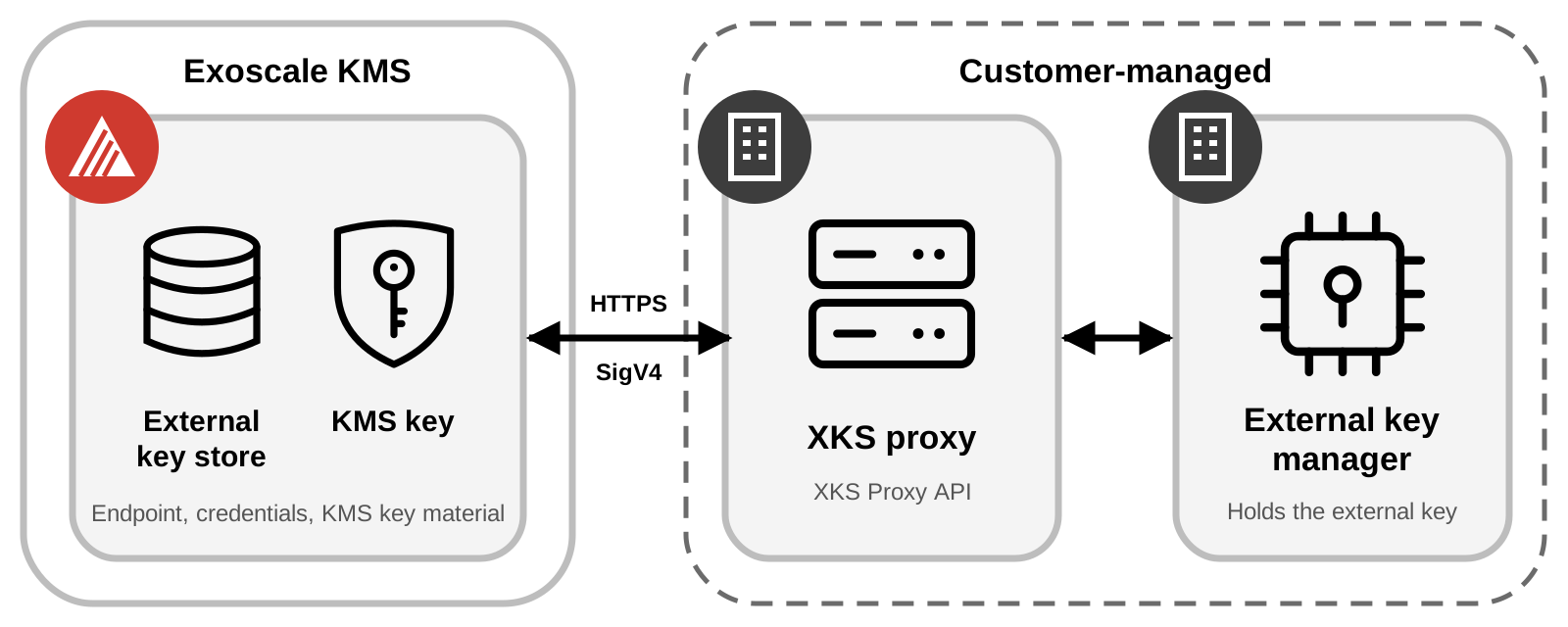
Control of the Root of Trust
With an external key store, you control the root of trust of your data. Data encrypted under a KMS key in an external key store can only be decrypted with the participation of your external key manager:
- If you temporarily revoke access, for example by disconnecting the key store, disconnecting your key manager from the proxy, or disabling the external key, Exoscale loses all access to that key until you restore it. During that time, ciphertext encrypted under the affected KMS keys cannot be decrypted.
- If you permanently revoke access, for example by destroying the external key, all ciphertext encrypted under the affected KMS keys becomes unrecoverable. The data is effectively crypto-shredded.
Revocation does not affect plaintext data keys that an application or a service already holds in memory. They remain usable until they are discarded.
External key stores are a significant change in how you operate cloud infrastructure. For most workloads, the additional operational burden and the greater risks to availability and performance outweigh the benefits. Consider an external key store only when your keys must remain solely under your control.
Shared Responsibility Model
With standard KMS keys, Exoscale operates every component involved in a cryptographic operation: it generates the key material, keeps it wrapped under the infrastructure Root Key, performs the operations, and keeps the service available. You decide who can use your keys through IAM, and which Exoscale services use them.
With KMS keys in an external key store, part of every operation runs on infrastructure that you operate, and the responsibility for that part moves to you.
Exoscale KMS remains responsible for the inner layer and for its side of the connection to your proxy. It generates and protects the key material of each KMS key, and encrypts every plaintext with it before anything is sent to your proxy, so that the ciphertext is never weaker than standard KMS ciphertext (see double encryption). It authorizes every request through IAM, authenticates your proxy through TLS, signs every request to it with your proxy credential, stores that credential encrypted, and validates every proxy response before returning a result.
You become responsible for the outer layer and for the components that serve it:
- External keys: They must exist, be enabled and be backed up. If an external key is destroyed, the data encrypted under the associated KMS keys cannot be recovered, by you or by Exoscale.
- XKS proxy: It must conform to the AWS KMS External Key Store Proxy API Specification, be reachable from Exoscale over public HTTPS, and forward each request to your external key manager. Exoscale KMS cannot verify that your proxy actually uses your external key manager, so a compromised proxy is equivalent to a compromised external key.
- External key manager: It must handle the volume of requests generated by your workloads, including those of the Exoscale services that use these keys. Its availability directly determines theirs.
- Key store configuration: The endpoint and the credential stored in the key store must match your proxy, including when you rotate the credential.
- Incident resolution: When an operation fails because of your proxy, your external key manager or the network between them and Exoscale, Exoscale cannot fix it. The troubleshooting guide helps you identify the cause.
The complete security model, including the validations performed by Exoscale KMS on proxy responses and the threats they cannot address, is detailed in the KMS SLA.
External Key Store Concepts
- External Key Store (XKS)
- The Exoscale KMS resource that represents your external key manager. It belongs to a single zone and holds the HTTPS endpoint of your XKS proxy and the credential that Exoscale KMS uses to sign requests to it. A key store is either
connectedordisconnected. Its KMS keys can only be created and used while it is connected. - External Key Manager
- A system outside of Exoscale that can generate 256-bit AES keys and perform symmetric encryption and decryption with them. It can be a physical HSM, a virtual HSM, or a software key manager, located on your premises, in a data center or in another cloud, and can consist of a single instance or of a cluster that shares keys.
- External Key
- The cryptographic key in your external key manager that is associated with a KMS key in an external key store, through its
external-key-id. It must be an enabled 256-bit AES key that can encrypt and decrypt. The external key never leaves your external key manager. If it is lost or deleted, ciphertext encrypted under the associated KMS key is unrecoverable. - XKS Proxy
- A customer-owned and customer-managed software application that mediates all communication between Exoscale KMS and your external key manager. It translates the generic requests of Exoscale KMS into a format that your vendor-specific external key manager understands. It must implement the AWS KMS External Key Store Proxy API Specification, so you can build it from the specification or use a compatible proxy from a vendor. Each key store is associated with exactly one proxy.
- Proxy Authentication Credential
- An access key and a secret key that you configure on your proxy and provide to Exoscale KMS when you create the key store. Exoscale KMS signs every request to the proxy with this credential using AWS SigV4, and stores the secret key encrypted. The credential is unrelated to your Exoscale API keys. You can update it at any time, for example to rotate it.
- Proxy APIs
- The only requests that Exoscale KMS sends to your proxy:
GetHealthStatusto check the proxy,GetKeyMetadatato validate an external key when a KMS key is created, andEncryptandDecryptfor cryptographic operations. For the paths and the operations that trigger them, see Set Up an External Key Store. - KMS Key in an External Key Store
- The KMS key resource in Exoscale KMS that references an external key. It has its own Key ID and its own key material, held by Exoscale KMS under the infrastructure Root Key, and is used like any other symmetric KMS key. See KMS Keys in External Key Stores.
Double Encryption
Data encrypted with a KMS key in an external key store is encrypted twice:
- Inner layer: Exoscale KMS encrypts the plaintext with the key material that it holds for the KMS key, using the standard symmetric encryption operation.
- Outer layer: Exoscale KMS sends the result to your XKS proxy, and your external key manager encrypts it again with the external key using AES-GCM.
Decryption runs in the opposite order: your external key manager first decrypts with the external key, then Exoscale KMS decrypts the result with the key material of the KMS key.
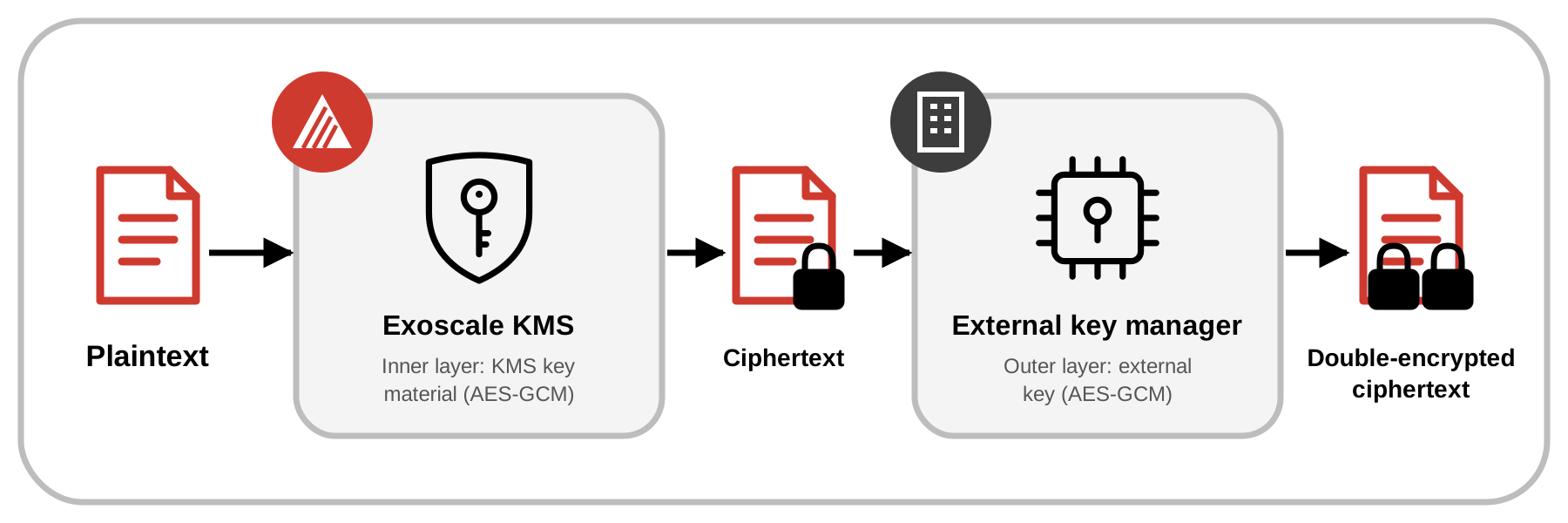
Double encryption has the following effects:
- Your plaintext never reaches your proxy or your external key manager. Only the inner ciphertext is sent, which also protects the data in transit.
- Exoscale KMS cannot decrypt any ciphertext produced by a KMS key in an external key store without your external key.
- You cannot decrypt that ciphertext outside of Exoscale, even with the external key.
- A deleted KMS key cannot be recreated from its external key. A new KMS key has different key material and cannot decrypt the ciphertext of the original key, even if it references the same external key.
How External Key Stores Work
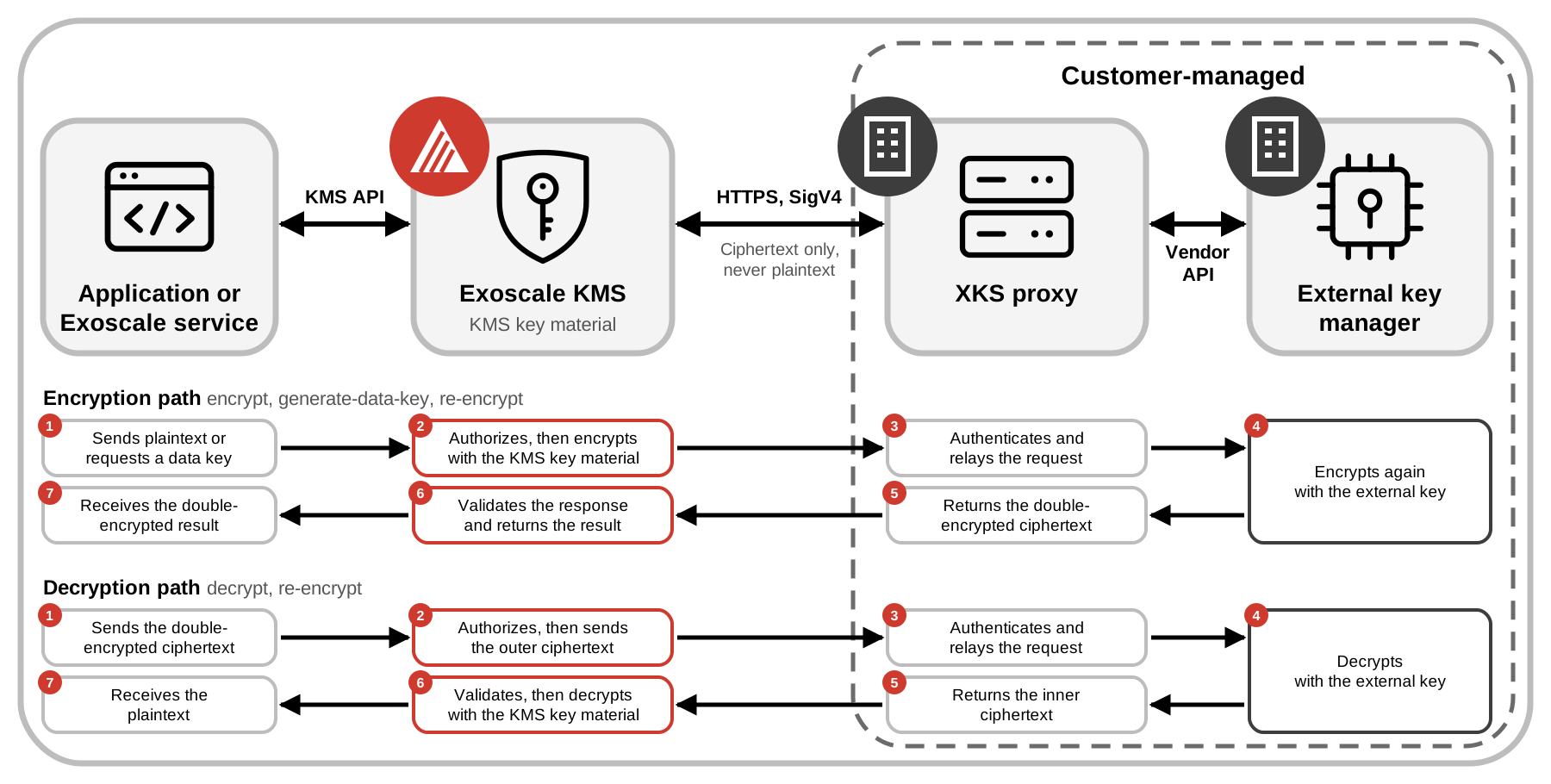
Every cryptographic operation on a KMS key in an external key store follows the same path through four components. The diagram shows that path, what crosses each link, and what each component does when data is encrypted and when it is decrypted. On each path, the request travels to the right and the response comes back to the left, and the numbers give the order of the steps.
The components and their links
- Application or Exoscale service: The caller. It uses the KMS API exactly as with any other KMS key, and does not interact with the proxy or the external key manager.
- Exoscale KMS: Authorizes every request through IAM, resolves the key store of the KMS key, and performs the inner layer of encryption with the KMS key material.
- XKS proxy: Receives requests from Exoscale KMS over HTTPS, signed with AWS SigV4. These requests only ever carry ciphertext: plaintext never leaves Exoscale KMS. The proxy authenticates each request and relays it to your external key manager through its vendor-specific API.
- External key manager: Performs the outer layer of encryption with the external key, which never leaves it.
Encryption path: encrypt, generate-data-key, and the destination side of re-encrypt.
The caller sends a plaintext, or requests a new data key, in which case Exoscale KMS generates it. Exoscale KMS authorizes the request and encrypts with the KMS key material. It sends the resulting ciphertext to your proxy, which relays it to your external key manager to be encrypted again with the external key. The double-encrypted ciphertext returns through the proxy to Exoscale KMS, which validates the response before returning the result to the caller. For generate-data-key, the caller receives both the plaintext data key and its double-encrypted copy.
Decryption path: decrypt, and the source side of re-encrypt.
The caller sends a double-encrypted ciphertext. Exoscale KMS authorizes the request and sends the outer ciphertext to your proxy, which relays it to your external key manager. The external key manager decrypts it with the external key and returns the result, still encrypted with the KMS key material, through the proxy. Exoscale KMS validates it, decrypts it with the KMS key material, and returns the plaintext to the caller.
A re-encrypt request combines both paths inside Exoscale KMS, so the plaintext is never returned to the caller. Whichever the operation, if the proxy or the external key manager does not answer, or refuses the request, the operation fails and no result is returned.
Proxy Connectivity and Authentication
Exoscale KMS reaches your XKS proxy over the public internet only. Your proxy must meet the following requirements:
- Endpoint: An absolute
https://<host>/<path>URL on port 443. Do not specify the port in the URL. The path is free, but/<prefix>/kms/xks/v1is recommended by the XKS Proxy API specification. - TLS: TLS 1.2 or later, with a certificate issued by a certificate authority trusted by Exoscale KMS, whose list is based on the Mozilla Root Store.
- Authentication: Exoscale KMS signs every request with AWS SigV4, using the service name
kms-xks-proxyand the Exoscale zone of the key store as the region, for examplech-gva-2. Configure your proxy with the same values.
For the full list of prerequisites, see Set Up an External Key Store.
Availability and Health
Every cryptographic operation on a KMS key in an external key store calls your proxy. The availability and latency of these operations, and of any Exoscale service that relies on these keys, depend on your proxy, your external key manager and the network between them and Exoscale.
Exoscale KMS checks the health of the proxy of every connected key store periodically, and reports the latest result with the key store. A healthy result reflects the connection between Exoscale KMS and your proxy, not the state of your external key managers, and does not guarantee that a subsequent operation succeeds. To monitor a key store, see Operate an External Key Store.
Restrictions
- KMS keys in an external key store support the
encrypt-decryptusage with theAES_256key spec only. Asymmetric keys are not supported. - They cannot be multi-zone keys.
- Automatic rotation is not enabled by default. You can enable it or rotate the key manually, which renews the key material held by Exoscale KMS, but not the external key.
- You can re-encrypt data from a standard KMS key to a KMS key in an external key store, and back.
- A key store can only be deleted once no KMS key references it.
For details, see Limits and Quotas.
Where to Start
To use an external key store, prepare your external key manager and an XKS proxy that meets the connectivity requirements, then:
- Set Up an External Key Store: Create and connect a key store, and create KMS keys in it.
- Operate an External Key Store: Monitor, update and delete a key store.
- Troubleshoot an External Key Store: Resolve proxy, credential and external key errors.