# Replication
Exoscale's Simple Object Storage (SOS) supports live bucket replication,
allowing an automatic asynchronous copy of objects between one bucket,
to one or multiple buckets across the same or a different zone.
This enables the creation of copies of buckets, in
the same or a different zone, covering needs for disaster recovery,
multi-zone storage synchronization, etc.
## Requirements
In order to enable bucket replication, both the source and destination(s)
buckets must be within the same Exoscale organization, and both of them need to
have object versioning enabled.
If the source bucket has Object Locking enabled, the destination one must also
have Object Locking enabled to allow a correct replication.
## Configuration Structure
The REST API of Exoscale's SOS allows you to configure the bucket replication
configuration using XML. The Exoscale Portal or the
Exoscale CLI offer a convenience mechanism to define it in the JSON format.
A replication configuration is composed of the unique identifier (uuid)
of an Exoscale IAM role, and one or more rules. The replication will assume
this IAM role to perform operations on your behalf, on both the source and
destination buckets. For example:
```xml
role-uuid
...
...
...
```
The IAM role must have the following permissions:
- `get-object` on the source bucket
- `put-object`, `put-object-*` on the destination bucket
## Rule configuration
Each rule will be configured with the following format:
- `ID`: a unique name
- `Priority`: integer used to identifify the precedence between conflicting
rules with the same destination bucket. The highest priority will win.
- `Status`: `Enabled` or `Disabled`, to disable or enable a given rule while
keeping the configuration
- `Filter`: section to filter the elements to be replicated
- `Prefix`: ensures the rule applies only to objects matching the configured prefix
- `DeleteMarkerReplication`: section to configure replication of delete markers
- `Status`: `Enabled` or `Disabled`: to disable or enable the replication
of delete markers
- `Destination`: section to configure the destination of the rule
- `Bucket`: Target bucket name
You can use the following minimal configuration as an example:
```xml
My-Rule-0
0
Enabled
Enabled
my-exo-destination-bucket
```
## Examples
### Simple Leader-Follower Setup
#### Using the CLI
In this example, we will do a simple configuration with one leader bucket,
replicating into the follower bucket. Writes in the leader will be visible
inside of the follower.
1. Using the following IAM configuration, create an IAM role for the replication:
```json
# policy.json
{
"default-service-strategy": "deny",
"services": {
"sos": {
"type": "rules",
"rules": [
{
"action": "allow",
"expression": "parameters.bucket == 'my-source' && operation == 'get-object'"
},
{
"action": "allow",
"expression": "parameters.bucket == 'my-destination' && (operation.startsWith('put-object') || operation.startsWith('delete-object') || operation.startsWith('abort-multipart-upload'))"
}
]
}
}
}
```
```bash
cat policy.json | exo iam role create --editable=true --description 'sos bucket replication between my-source and my-destination' --policy - replication-my-source-my-destination
```
Output:
```bash
┼─────────────┼─────────────────────────────────────────────────────────────┼
│ ID │ 6f00a21e-a535-4286-86c5-e81eeab3b4ff │
│ Name │ replication-my-source-my-destination │
│ Description │ sos bucket replication between my-source and my-destination │
│ Editable │ true │
│ Labels │ n/a │
│ Permissions │ n/a │
┼─────────────┼─────────────────────────────────────────────────────────────┼
```
2. Create the source and destination buckets, with the correct configuration
```bash
exo storage create --zone ch-dk-2 my-source
```
Output:
```bash
┼──────────────────┼────────────────────────────────────────────┼
│ STORAGE │ │
┼──────────────────┼────────────────────────────────────────────┼
│ Name │ my-source │
│ Zone │ ch-dk-2 │
│ ACL │ │
│ │ Read - │
│ │ Write - │
│ │ Read ACP - │
│ │ Write ACP - │
│ │ Full Control xxxxxxxxxxxxxxxxxxxxxxx │
│ │ │
│ CORS │ │
│ Object Ownership │ BucketOwnerEnforced │
┼──────────────────┼────────────────────────────────────────────┼
```
```bash
exo storage create --zone at-vie-1 my-destination
```
Output:
```bash
┼──────────────────┼────────────────────────────────────────────┼
│ STORAGE │ │
┼──────────────────┼────────────────────────────────────────────┼
│ Name │ my-destination │
│ Zone │ at-vie-1 │
│ ACL │ │
│ │ Read - │
│ │ Write - │
│ │ Read ACP - │
│ │ Write ACP - │
│ │ Full Control xxxxxxxxxxxxxxxxxxxxxxx │
│ │ │
│ CORS │ │
│ Object Ownership │ BucketOwnerEnforced │
┼──────────────────┼────────────────────────────────────────────┼
```
```bash
exo storage bucket versioning enable --zone ch-dk-2 my-source
exo storage bucket versioning enable --zone at-vie-1 my-destination
```
3. Using the following replication configuration, enable the replication between the two buckets.
```json
# config.json
{
"Role": "6f00a21e-a535-4286-86c5-e81eeab3b4ff",
"Rules": [{
"ID": "vie1-follower",
"Priority": 1,
"Filter": {
"Prefix": ""
},
"Status": "Enabled",
"DeleteMarkerReplication": {
"Status": "Enabled"
},
"Destination": {
"Bucket": "my-destination"
}
}]
}
```
```bash
exo storage bucket replication set --zone ch-dk-2 sos://my-source ./config.json
```
4. Confirm it works as expected:
```bash
exo storage upload -r ./ sos://my-source/
```
Output:
```bash
config.json [===========================================================================] 372.00 b / 372.00 b | 0s
policy.json [===========================================================================] 418.00 b / 418.00 b | 0s
```
Output:
```bash
exo storage list sos://my-source/
```
Output:
```bash
2025-02-20 15:50:12 UTC 372 B config.json
2025-02-20 15:50:13 UTC 418 B policy.json
```
Output:
```bash
exo storage list sos://my-destination/
```
Output:
```bash
2025-02-20 15:50:12 UTC 372 B config.json
2025-02-20 15:50:13 UTC 418 B policy.json
```
You can also check the Replication Status of each object individually:
```bash
exo storage show sos://my-source/config.json
```
Output:
```bash
[...]
│ Path │ config.json │
│ Bucket │ my-source │
│ Replication Status │ COMPLETED │
```
```bash
exo storage show sos://my-destination/config.json
```
Output:
```bash
[...]
│ Path │ config.json │
│ Bucket │ my-destination │
│ Replication Status │ REPLICA │
```
#### Using the Portal
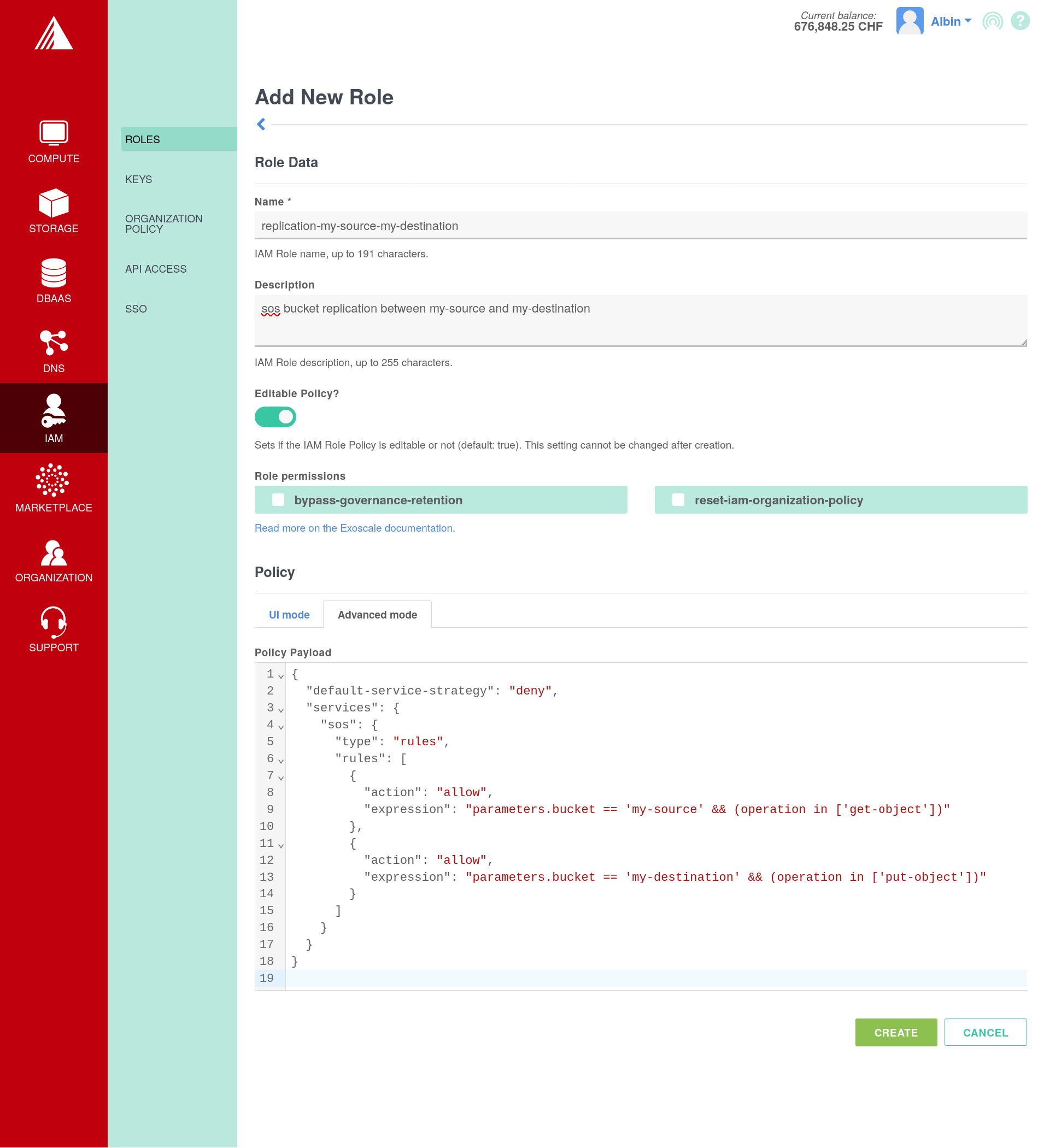
1. In `IAM` -> `Roles` -> `Add`, create a role with the following configuration:
1. `name`: `replication-my-source-my-destination`
2. `description`: `sos bucket replication between my-source and my-destination`
3. `Editable Policy`: true
4. `Policy`: Using the `Advanced mode`, submit the following configuration:
```json
{
"default-service-strategy": "deny",
"services": {
"sos": {
"type": "rules",
"rules": [
{
"action": "allow",
"expression": "parameters.bucket == 'my-source' && operation == 'get-object'"
},
{
"action": "allow",
"expression": "parameters.bucket == 'my-destination' && (operation.startsWith('put-object') || operation.startsWith('delete-object') || operation.startsWith('abort-multipart-upload'))"
}
]
}
}
}
```
2. In `Storage` -> `Add`, create the two buckets.
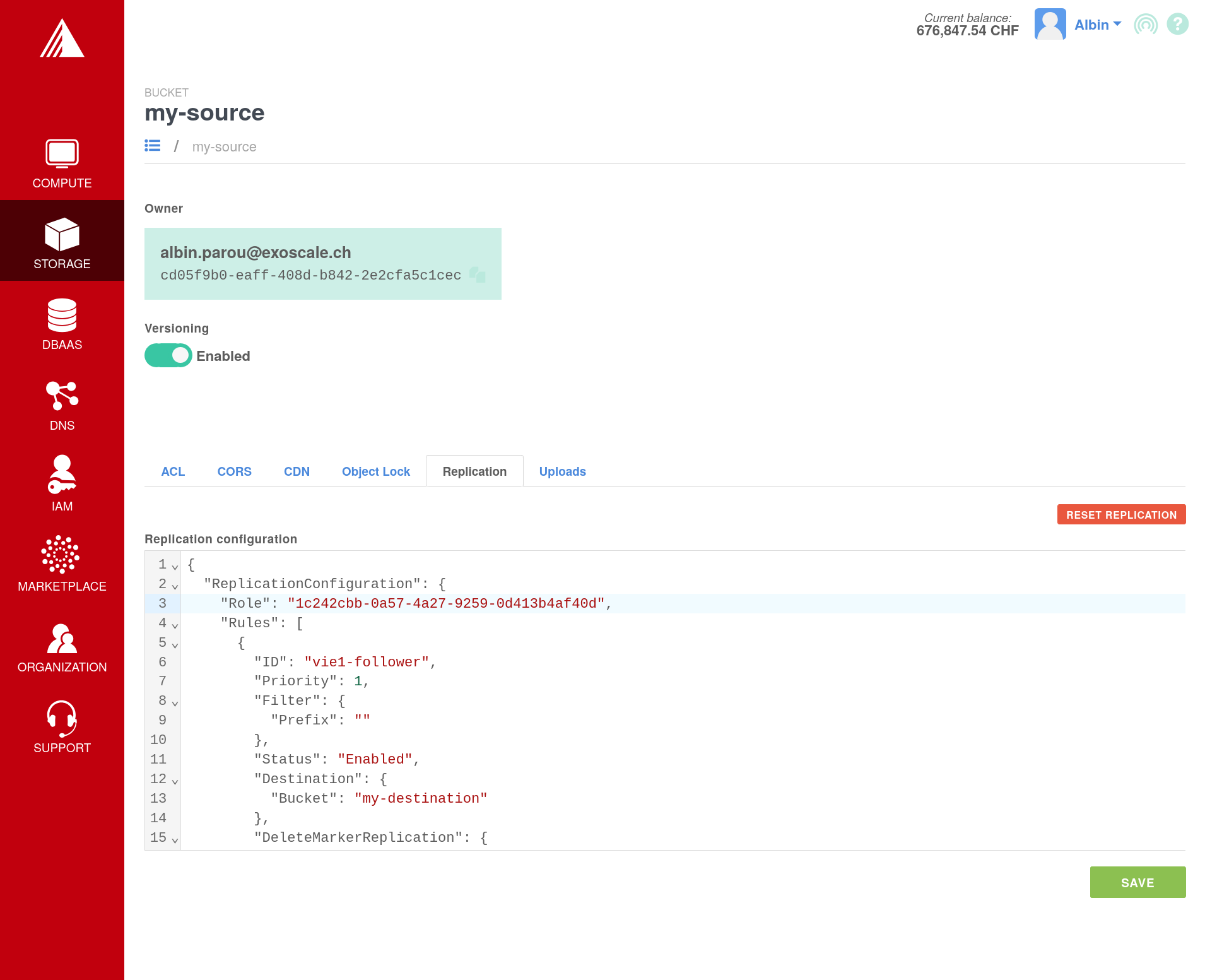
1. In the list of buckets, for your two bucket, click on `...` and open the
`details` page. Enable `Versioning` for both buckets.
2. For our source bucket, open the `Replication` tab and write the following configuration:
```json
{
"Role": "6f00a21e-a535-4286-86c5-e81eeab3b4ff",
"Rules": [{
"ID": "vie1-follower",
"Priority": 1,
"Filter": {
"Prefix": ""
},
"Status": "Enabled",
"DeleteMarkerReplication": {
"Status": "Enabled"
},
"Destination": {
"Bucket": "my-destination"
}
}]
}
```
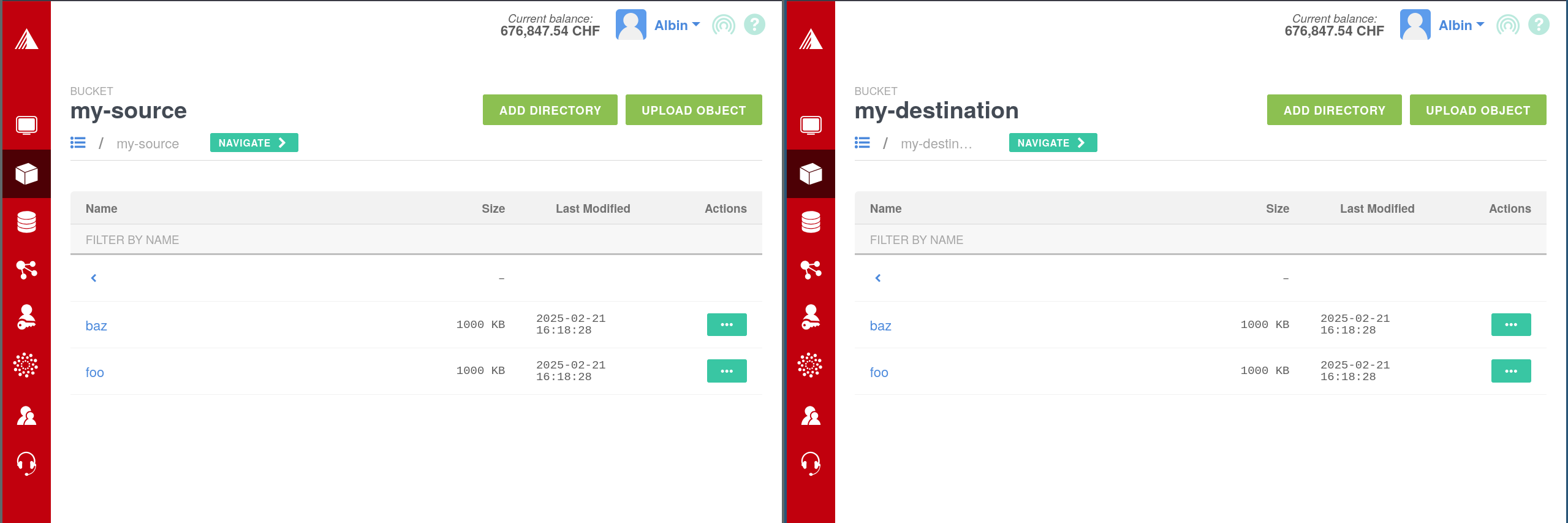
3. Finally, we can upload objects in our source bucket, and confirm they
eventually appear in the destination bucket.
#### Using Terraform
1. Using the following Terraform configuration, we will directly create a IAM
role, two buckets and the cross-bucket replication rule :
```terraform
# main.tf
terraform {
required_providers {
exoscale = { source = "exoscale/exoscale" }
aws = { source = "hashicorp/aws" }
}
}
provider "exoscale" {}
provider "aws" {
alias = "ch-dk-2"
region = "ch-dk-2"
endpoints {
s3 = "https://sos-ch-dk-2.exo.io"
}
# Disable AWS-specific features
skip_credentials_validation = true
skip_region_validation = true
skip_requesting_account_id = true
}
provider "aws" {
alias = "at-vie-1"
region = "at-vie-1"
endpoints {
s3 = "https://sos-at-vie-1.exo.io"
}
# Disable AWS-specific features
skip_credentials_validation = true
skip_region_validation = true
skip_requesting_account_id = true
}
resource "aws_s3_bucket" "source" {
provider = aws.ch-dk-2
bucket = "my-source-terraform"
}
resource "aws_s3_bucket" "destination" {
provider = aws.at-vie-1
bucket = "my-destination-terraform"
}
resource "aws_s3_bucket_versioning" "source" {
provider = aws.ch-dk-2
bucket = aws_s3_bucket.source.id
versioning_configuration {
status = "Enabled"
}
}
resource "aws_s3_bucket_versioning" "destination" {
provider = aws.at-vie-1
bucket = aws_s3_bucket.destination.id
versioning_configuration {
status = "Enabled"
}
}
resource "exoscale_iam_role" "iam-source-to-destination-tf" {
name = "sos-replication:${aws_s3_bucket.source.id}:${aws_s3_bucket.destination.id}"
description = "sos bucket replication between ${aws_s3_bucket.source.id} and ${aws_s3_bucket.destination.id}"
editable = true
policy = {
default_service_strategy = "deny"
services = {
sos = {
type = "rules"
rules = [
{
action= "allow"
expression = "parameters.bucket == '${aws_s3_bucket.source.id}' && (operation in ['get-object'])"
},
{
action= "allow"
expression = "parameters.bucket == '${aws_s3_bucket.destination.id}' && (operation.startsWith('put-object') || operation.startsWith('delete-object') || operation.startsWith('abort-multipart-upload'))"
}
]
}
}
}
}
resource "aws_s3_bucket_replication_configuration" "replication" {
provider = aws.ch-dk-2
depends_on = [aws_s3_bucket_versioning.source, aws_s3_bucket_versioning.destination]
bucket = aws_s3_bucket.source.id
role = "arn:aws:iam::third-party:${exoscale_iam_role.iam-source-to-destination-tf.id}"
rule {
id = "multi-zone"
priority = 1
status = "Enabled"
filter {
prefix = ""
}
delete_marker_replication {
status = "Enabled"
}
destination {
bucket = "arn:aws:s3:::${aws_s3_bucket.destination.id}"
}
}
}
```
2. You can directly create all of the resources ussing the following command:
```bash
terraform apply
```
Output:
```
[...]
Plan: 6 to add, 0 to change, 0 to destroy.
Do you want to perform these actions?
Terraform will perform the actions described above.
Only 'yes' will be accepted to approve.
Enter a value: yes
[...]
Apply complete! Resources: 6 added, 0 changed, 0 destroyed.
```
3. Confirm it works as expected:
```bash
exo storage upload -r ./ sos://my-source-terraform/
```
Output:
```bash
.terraform/prov… [==============================================================================] 34.68 KiB / 34.68 KiB | 0s
.terraform/prov… [==============================================================================] 16.33 KiB / 16.33 KiB | 0s
.terraform/prov… [==============================================================================] 4.86 KiB / 4.86 KiB | 0s
.terraform/prov… [==============================================================================] 32.26 MiB / 32.26 MiB | 0s
.terraform/prov… [==============================================================================] 16.37 KiB / 16.37 KiB | 0s
.terraform/prov… [==============================================================================] 669.88 MiB / 669.88 MiB | 10s
.terraform/prov… [==============================================================================] 16.37 KiB / 16.37 KiB | 0s
.terraform/prov… [==============================================================================] 664.45 MiB / 664.45 MiB | 9s
.terraform.lock… [==============================================================================] 2.52 KiB / 2.52 KiB | 0s
main.tf [==============================================================================] 2.64 KiB / 2.64 KiB | 0s
terraform.tfsta… [==============================================================================] 9.05 KiB / 9.05 KiB | 0s
```
```bash
exo storage list sos://my-source-terraform/
```
Output:
```bash
DIR .terraform/
2025-07-09 08:31:57 UTC 2.5 KiB .terraform.lock.hcl
2025-07-09 08:31:57 UTC 2.6 KiB main.tf
2025-07-09 08:31:58 UTC 9.1 KiB terraform.tfstate
```
```bash
exo storage list sos://my-destination-terraform/
```
Output:
```bash
DIR .terraform/
2025-07-09 08:31:57 UTC 2.5 KiB .terraform.lock.hcl
2025-07-09 08:31:57 UTC 2.6 KiB main.tf
2025-07-09 08:31:58 UTC 9.1 KiB terraform.tfstate
```
You can also check the Replication Status of each object individually:
```bash
exo storage show sos://my-source-terraform/main.tf
```
Output:
```bash
[...]
│ Path │ main.tf │
│ Bucket │ my-source-terraform │
│ Replication Status │ COMPLETED │
```
```bash
exo storage show sos://my-destination-terraform/main.tf
```
Output:
```bash
[...]
│ Path │ main.tf │
│ Bucket │ my-destination-terraform │
│ Replication Status │ REPLICA │
```
### Bi-Directional Replication
You can also synchronize two buckets in both direction. This can be used by
example for creating an eventually-consistent multi-active system, or to ensure
easy failover and rollback of your application in case of datacenter faults.
Writes to any of the two buckets will be eventually replicated to the other.
Writes are only replicated once, this will not create any infinite loops in the
replication process.
1. Using the following IAM configuration, create an IAM role for the replication:
```json
# a-b.json
{
"default-service-strategy": "deny",
"services": {
"sos": {
"type": "rules",
"rules": [
{
"action": "allow",
"expression": "parameters.bucket == 'bucket-a' && operation == 'get-object'"
},
{
"action": "allow",
"expression": "parameters.bucket == 'bucket-b' && (operation.startsWith('put-object') || operation.startsWith('delete-object') || operation.startsWith('abort-multipart-upload'))"
}
]
}
}
}
```
```json
# b-a.json
{
"default-service-strategy": "deny",
"services": {
"sos": {
"type": "rules",
"rules": [
{
"action": "allow",
"expression": "parameters.bucket == 'bucket-b' && operation == 'get-object'"
},
{
"action": "allow",
"expression": "parameters.bucket == 'bucket-a' && (operation.startsWith('put-object') || operation.startsWith('delete-object') || operation.startsWith('abort-multipart-upload'))"
}
]
}
}
}
```
```bash
cat a-b.json | exo iam role create --editable=true --description 'sos bucket replication between bucket-a and bucket-b' --policy - replication-bucket-a-bucket-b
```
Output:
```bash
┼─────────────┼──────────────────────────────────────────────────────┼
│ ID │ 91390068-c386-4d9d-b0f1-951e2baa818e │
│ Name │ replication-bucket-a-bucket-b │
│ Description │ sos bucket replication between bucket-a and bucket-b │
│ Editable │ true │
│ Labels │ n/a │
│ Permissions │ n/a │
┼─────────────┼──────────────────────────────────────────────────────┼
```
```bash
$ cat b-a.json | exo iam role create --editable=true --description 'sos bucket replication between bucket-b and bucket-a' --policy - replication-bucket-b-bucket-a
```
Output:
```bash
┼─────────────┼──────────────────────────────────────────────────────┼
│ ID │ e23c886b-8091-4adc-b567-7bf796bed37b │
│ Name │ replication-bucket-b-bucket-a │
│ Description │ sos bucket replication between bucket-b and bucket-a │
│ Editable │ true │
│ Labels │ n/a │
│ Permissions │ n/a │
┼─────────────┼──────────────────────────────────────────────────────┼
```
2. Create the A and B buckets, with the correct configuration
```bash
exo storage create --zone ch-dk-2 bucket-a
[...]
exo storage create --zone at-vie-1 bucket-b
[...]
exo storage bucket versioning enable --zone ch-dk-2 bucket-a
exo storage bucket versioning enable --zone at-vie-1 bucket-b
```
3. Using the following replication configuration, enable the replication between the two buckets.
```json
# conf-a.json
{
"Role": "91390068-c386-4d9d-b0f1-951e2baa818e",
"Rules": [{
"ID": "to-bucket-b",
"Priority": 1,
"Filter": {
"Prefix": ""
},
"Status": "Enabled",
"DeleteMarkerReplication": {
"Status": "Enabled"
},
"Destination": {
"Bucket": "bucket-b"
}
}]
}
```
```json
# conf-b.json
{
"Role": "e23c886b-8091-4adc-b567-7bf796bed37b",
"Rules": [{
"ID": "to-bucket-a",
"Priority": 1,
"Filter": {
"Prefix": ""
},
"Status": "Enabled",
"DeleteMarkerReplication": {
"Status": "Enabled"
},
"Destination": {
"Bucket": "bucket-a"
}
}]
}
```
```bash
exo storage bucket replication set --zone ch-dk-2 sos://bucket-a ./conf-a.json
exo storage bucket replication set --zone at-vie-1 sos://bucket-b ./conf-b.json
```
4. Confirm it works as expected:
```bash
exo storage upload *a.json sos://bucket-a
```
Output:
```bash
b-a.json [==============================================================================] 410.00 b / 410.00 b | 0s
conf-a.json [==============================================================================] 364.00 b / 364.00 b | 0s
```
```bash
exo storage upload *b.json sos://bucket-b
```
Output:
```bash
a-b.json [==============================================================================] 410.00 b / 410.00 b | 0s
conf-b.json [==============================================================================] 364.00 b / 364.00 b | 0s
```
```bash
exo storage list sos://bucket-a
```
Output:
```bash
2025-02-24 14:06:34 UTC 410 B a-b.json
2025-02-24 14:06:28 UTC 410 B b-a.json
2025-02-24 14:06:28 UTC 364 B conf-a.json
2025-02-24 14:06:34 UTC 364 B conf-b.json
```
Output:
```bash
exo storage list sos://bucket-b
```
Output:
```bash
2025-02-24 14:06:34 UTC 410 B a-b.json
2025-02-24 14:06:28 UTC 410 B b-a.json
2025-02-24 14:06:28 UTC 364 B conf-a.json
2025-02-24 14:06:34 UTC 364 B conf-b.json
```
## Cost Impact
Using bucket replication is free, but replicated objects will count
towards your total storage usage. If you replicate an entire bucket
within the same or across zones, your storage consumption will
**double**.
## Limitations
* SOS doesn't support Batch Replication. Only new data mutations will be
replicated.
* Objects encrypted with SSE-C will not be replicated
* As SOS doesn't support Object Tagging, filters referencing tags
will not be evaluated
* Source and destination buckets must be within the same organization